All Articles by Sangkrit

Register/transfer domain names at http://system.sangkrit.net and mail to system@sangkrit.net to get your web/app made/managed as per the budget allocated.

4617 Articles

How To Migrate From WordPress To Managed WordPress?

Managed WordPress provides you a hassle-free environment to run your website. It offers you automatic setup, backups, and easy software updates paired with round-the-clock online support.

The new Managed WordPress plans come with an auto-migration feature that allows anyone to conveniently move his existing WordPress website to Managed WordPress.

To start you just need to subscribe to a Managed WordPress plan, choose the option of migrating your old website and then enter your login credentials to proceed. It automatically handles everything else and suggests whatever you need to do next during your website transfer process.

The following steps will make the entire process easier and understandable for you. Once you are subscribed to Managed WordPress, visit your SANGKRIT.net product page and follow these steps:

  1. In the Managed WordPress section, select Manage All
  2. Next to Managed WordPress, select + Create Site
  3. Select the Managed WordPress plan you want to use for your website, and then select the Next button
  4. Select Migrate an existing WordPress site option
  5. Follow the wizard, you will be asked to fill in these details:
    • The domain name of the website you are migrating
    • The WordPress Username and Password for the site you are migrating
  6. Select Next to start the migration process

Now, wait for the migration to complete. Larger and more complex websites could take more time to migrate. You will get an email as soon your website is fully transferred to Managed WordPress.

How To Bulk Sell Products In WordPress Ecommerce Website?

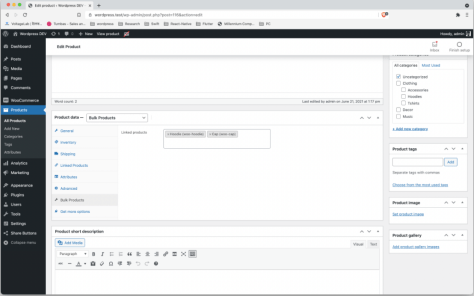
You can sell bulk products in one product group by associating and linking multiple products at one price. The new WordPress WooCommerce plugin lets you to do this in a very easy way.

Simply start by installing-activating the new Bulk Product Selling plugin on your WordPress Ecommerce website. Once activated, visit the add new product page or open any old product for editing.

On the page, inside the product data section which is present below your product description section, you will see a new ‘Bulk Product’ tab is added. Click that tab and start typing the name of the product you want to link, once the product name is displayed, click it and it will be added.

Following this way you can link as many products as you want. Once you are finished adding your products in the bulk products section. Simply update or publish your product.

That’s it. Visit the front end of your website to see it working. The plugin works for simple, variable, and other types of products of your eCommerce website. If you yet don’t have a website, you can easily create one yourself with Managed WordPress.

House Is Business

A house of Sangkrit is your best investment. This works as your ultimate placement upon planet Earth where you startup into internet age to make your family begin into a domestic entrepreneurship along with homeschooling your children also into that. Simply invent your functional comfort within to work from home.

Everyone must own or have a plan to own an independent house somewhere to settle down like that or rent this out.

That is how your house is business above all; either facilitating for your home along with your office and your children’s school as well or to bring you an additional regular income along with capital appreciation on your investment.

Mother Holds All The Powers To Reinvent The Humankind

Everywhere, without discrimniating on the basis of a gender, mothers must introduce all their children alike into all the household chores during day-to-day lives. This is essential with the begining of every upbringing to keep family folks ever happily together.

Not to raise the monsters anymore

Simply by giving necessary lessons in daily household chores while upbringing their sons in particular, mothers must take a caution for not to raise the monsters anymore.

Since the motherhood initially formats the mindset of the children so a mother holds all the powers to reinvent the humankind.

Practicing the first fundamental is a must

At every house of Sangkrit, everyday begins with everybody -without any exception- getting involved in cleaning the house. Thereafter everybody gets involved in cooking for preparing their brunch. So that they enjoy their meals to rest a while before to begin any programming or blogging.

Practicing above four fundamentals in such a way, forms a Sangkrit household and cleaning is the first so foremost of the four fundamentals practiced by everyone alike in a house of Sangkrit.

The Shape Of Democracy In Internet Age

Random thoughts

by Uday Kumar Varma

Former Secretary,  Ministry of Information and Broadcasting, Government of India.

That we are past Industrial Age and already in the new Age of Internet, is a phenomenon and a fact that we have come to recognize and reluctantly accept. The challenge now is how to understand and deal with the requirements of this age and how to harness and utilize its potential for furtherance of the interest of mankind and human existence on this planet. A more formidable and difficult challenge will be to mould and adapt our thinking and attitudes, our ambitions and impulses, our notions of growth and development and progress and equally significantly how to temper and tame our hubris and arrogance and intemperance in disowning and discarding what we have toiled to build over last many centuries with our talent, intellect, sweat and blood. For, detachment from something that we so passionately and painstakingly created, amplified and sustained is rarely uneventful or painless.

One immediate implication of the Internet Age will be on our governance structures and political institutions like democracy. Will democracy get strengthened, will it be fairer, more equitous and mature, and could it indeed become truly representative? Or will it become another instrument to be manipulated for creating narratives and discourses that serve the interests of those who control the use of internet? It’s a very important question and demand urgent attention from all thinking people in the world.

My own understanding of what has come to pass in past over a year and a half, makes me believe that there is no way we are going to turn back to old ways of our living. The society-its mechanics and dynamics, the institutions that so far defined our thoughts, concepts, planning, organizing, working and interacting, the daily chores that structured our personal, family and professional lives- all of these have transformed and this transformation is here not only to stay, but only get intensified.

The new world order will not brook wasteful processes and prolonged debates and deliberations. The representative nature of our collective expression or articulation because one did not have access to everyone else’s attention and information shall become irrelevant and redundant.

Out of over 6 .6 billion people in the world, internet has access to almost half of them. There are countries where this access is reaching a level that can be called universal while there are pockets where it is still in the realm of a distant dream and utopia. We have been calling this the digital divide for some time now. Is this divide narrowing? Is this gap getting bridged? Is the reach of the most advanced and the most backward and the information hiatus between the most primitive and the most advanced amongst the human race likely to continue and sustain for long?

The paradigm shift in the way we have been living and surviving in last year and a half offers enough evidence to suggest that it is just a matter of time when this so called divide may be a thing of past. The most remarkable aspect of our survival in the times of corona is that the world has not seen populations dying of hunger, of want, of lack of food or water or even medicine. And this has happened because we learnt to use the internet to maintain our supply chains, our processes of production and procurements and distribution. We learnt to work from home and to learn and teach and educate on line without the shelter of a class room or university building. We missed the ways we used to work but quickly adapted ourselves.

This then is going to be the ‘new normal’, and no doubt we will feel nostalgic about our former life styles, their pleasures and their advantages, those conveniences and comforts, we are never going to go back to these old ways. All concepts of an era, borne out of our advancement emanating from Industrial Age and its gifts and legacies today stand on their head and shall only be replaced, substituted and supplanted.

Not too far in the future, shall we need a parliament? Why do you need to elect 600 odd people’s representatives paying an astronomical price in terms of money, time, energy and resources, just to debate on policy matters and take a majority view when each one of us can directly express our opinion and views on any issue under the sun with which we are concerned? At a click of a key, we can directly and decisively opine whether we want or need a law, or how a scheme of welfare for children and women should be conceived and created. We can participate directly in telling the government whether we need a law, a regulation, for whom and what should constitute its contents and components? The new Age of Internet will enable us to do so. So do expect in near future abolition of or at least a radical transformation in the way we think and conceive of making laws in this country or for that matter in any other countries and we don’t need MPs and MLAs to decide what law should be framed and enacted for us. These bodies, no doubt, will have some other useful purpose but we will not need them the way they exist today.

But there always exists another possibility- perversity and pessimism, destruction and disorder- being as natural an impulse, choice and fascination as are creation and conception. What if some or many of us consciously decide and choose the technical manipulation of information and data to further consolidate control and authority- a weakness and vulnerability that nature seems to have endowed upon us as generously as it does the spirit of benevolence, altruism and sacrifice. And such a possibility is not merely a fear or apprehension, it is real, palpable and experiential.

Notwithstanding the uncertainties and attendant excitement of understanding the unraveling of imminent possibilities, one is inclined to be convinced on the course of the future democracies of the world set and destined to reinvent and re-engineer themselves. And this will only be a beginning. Institutions after institutions so assiduously and craftily built during the Industrial Era will crumble under their weights as increasingly they will find little utility, little value and no justification for their continuing existence. Be ready instead to embrace and accept and own new order of Institutions- in every sphere and dimension of human life and existence.

Practicing The Fourth Fundamental

WordPress is the free press for everyone. So don’t ever forget to say a hello to the world from wherever you are witnessing whatever since you are the people’s correspondent for archiving the real history of humanity.

Blogging is the fourth fundamental of practicing Sangkrit that forms the most effective media in the hands of any individual humankind. Your practising the fourth fundamental empowers the people in general.

Modern tyrants and totalitarian regimes are not afraid of any organised media any more but they all fear alike any free blogging by their people. You must not remain one but become many to overcome that. Help everyone else as well in practicing the fourth fundamental.

Who Will Watch The Watch-dog?

Quis custodiet ipsos custodes?

by Uday Kumar Varma

Former Secretary,  Ministry of Information and Broadcasting, Government of India.

To believe that the overall conduct of the news media, in particular TV news Media, in the wake of the recent COVID epidemic is merely a transient aberration, will only reveal an ostrich-like approach, living in stark denial of what is staring us in the face. In ignoring the salience and propriety of issues that confront our news media space and the prevalent discourse that dominates this space these days – decidedly one of the most corrosive, difficult and depressing in recent times, will be perilous, to say the least.

Unfortunately, and ironically, most crises arise, perpetuate and even fester because many of us despite feeling resentment, frustration and even anger choose to be spectators and silent witnesses as grossly improper and unjust events happen around us and eventually overtake us. It is the silence of the sane and reasonable that pushes us down the abyss while a small, shouting and bullying minority decide and dictate; and rest of us choose to collectively suffer in silence, while individually and internally remaining discontented and uncomfortable. And it is true across every segment of society – politics, bureaucracy, academia, intelligentsia, civil society and of course news media. It has happened in the past; it happens even today and it will continue to happen in future as well, such is the nature of our intellectual and cerebral evolution.

History and our collective understanding of the growth of human civilization bear testimony to the fact that as far as freedom of expression and thoughts and ideas is concerned, the State shall never be able to either control or influence it for long. The nature of human intellect, freedom, innovation, endeavour and wisdom as also follies and foibles, ensure a free flow of thinking and an equally fierce desire and will to articulate it. No state can ever be able to control, subordinate or subjugate these desires, aspirations, tendencies, capacities and their free flowing expressions. Therefore, when we talk of news media content, the state shall be in the least effective position to offer an endurable and lasting mechanism to moderate or monitor content. Actually, it is news media itself that should find mechanisms to draw well thought out and defined ‘Lakshmana rekha’. Anyone else doing so will inherently invite resentment, refusal and rebellion. It is this aspect that needs appreciation when one discusses why industry should itself volunteer to effectively monitor content.

It will be foolishly and patently erroneous to argue, as a few among us may tend to believe and assert that sanity and propriety has taken leave of the news media world, that everyone in news media today thinks alike and are in broad agreement with the approach, attitudes and motives that dominate and decide the conduct of news media. Nothing can be more preposterous. There are very sensible elements and voices – many of them – not just a handful, who vehemently disagree with what news media is doing today. While most have chosen to strike silence and stoicism, many have voiced their concerns and worries and discomfort and apprehensions in private and at times but only occasionally, even openly. If only some of them are able to pluck enough courage and say what their conscience is constantly goading them to do so, the discourse will change. Or else it may as well continue on its present disastrous trajectory, much as the political philosopher Burke had warned, “the only thing necessary for the triumph of evil is for good men to do nothing”.

It is possible to invent, create and sustain any narrative and propagate, peddle and sell it, howsoever far removed it may be from reality and truth. The Palestinian American historian Edward Said, author of the monumental ‘Orientalism’ called such possibility through ‘a whole structure of opinion and discourse’. If some among us can successfully create a subversive, corrosive and subjective perspective, the more intelligent and enlightened amongst us, can as well create a counter narrative- positive, hopeful, constructive, pacifying, and healing.

News media has always enjoyed a certain mystical ‘mojo’ – a magical charm that places her on a pedestal higher and different from others. She acts as a watch dog for everyone else and claims it as one of her basic and inherent rights and privileges. But who will be overseeing her own conduct and character? Who would do the course correction as and when it is required? To argue that news media is a power unto itself and beyond any scrutiny will be in denial of the basic and fundamental law of nature- a law that requires a balance of forces, powers and potentials- and without which neither the universe nor all that it encompasses could originate or exist. Media has the option to be its own watch dog. Is she willing to confront this reality and challenge and and make bold to resolve it?

My own logical conviction is that happen it eventually would! The challenge, of course, pivots around the issue of when and who must take the initiative in this direction.

How To Enable PreOrdering In Your WordPress Ecommerce Store?

You can allow your customers to pre-order upcoming products from your WordPress Ecommerce website. This way you can enable the selling of the product before they become available in your inventory.

Pre Order for WooCommerce plugin lets you do this very easily on your online store. To start you should have a WordPress Ecommerce website, if you don’t have one, you can easily make it at SANGKRIT.net by registering or transferring your domain and then subscribing to WordPress Ecommerce.

Next, install-activate the new WordPress plugin called Pre Order for WooCommerce. Upon activation, the plugin will add two new fields in the inventory tab present under the ‘Product Data’ section of your product admin screen, as shown in the above-given screenshot.

The two fields are:

  1. Pre Order Product – The checkbox option allows you to enable pre-ordering on selected products
  2. Pre Order Date – The field allows you to set a product shipping date on the pre-order enabled product

Once you enter the correct information in these two fields, enter order important product information such as price, name, variations etc and then publish or update your product.

That’s it. The product’s default ‘Buy Now’ button will now get changed to the ‘Preorder Now’ button allowing your customers to pre-order that specific product from your website.

How To Lock A Directory On Your Dedicated Server?

The directory privacy feature of WHM and cPanel of your dedicated server, VPS, or hosting allows you to secure any web directory from unauthorized access on the web.

You can lock a directory with a username and password so that anyone who attempts to open it must go through its login process. You can secure specific directories on your server. This feature simply modifies htaccess and htpasswd configurations to restrict access to those files on your websites.

To use the feature, simply login to the cPanel of your server and select a directory to manage:

  1. To select a directory, simply click the desired directory’s name
  2. To view and select subdirectories, simply click the parent directory’s name and select the desired subdirectory
  3. To configure the security settings for a directory or subdirectory, simply click the Edit option present under the Actions column
  4. To password protect the selected directory, select the password protect this directory checkbox
  5. Enter a display label for the directory in the enter a name for the protected directory text box
  6. Click the Save button and a confirmation message will appear
  7. Click Go Back to return to the directory’s configuration page

Note,

  • In step number four, to remove the password protection from a directory, simply deselect the Password protect this directory checkbox and save your changes
  • In step number five, This name only functions as a label for the directory. So do not confuse it with the directory’s main name

Next,

Once you have locked your directory by completing the above-given steps, you will need to create a user that can have access to that directory.

To create a user for a directory, your directory must have correct permissions. In case you cannot create a user, then change the directory’s permissions to 0700 using the file manager interface.

To create an authorized user:

  1. On the same page, enter the desired username in the Username text box
  2. Enter and confirm the new password in the appropriate text boxes
  3. Click Save and a confirmation message will appear
  4. Now click Go Back to return to the directory’s configuration page

Remember,

A protected directory’s subdirectories inherit their parent directory’s password protection. The lock icon indicates that Directory Privacy configurations already exist for that specific directory.

It does not protect the directories that users access via FTP, SFTP, Web Disk, and other similar services, or if any user accesses the files locally on the server. This is because when a user accesses secure directories on a server via these specified services, he already goes through the login process so the system doesn’t prompt him for another login.

In case you want to secure your directories and files locally on the server then use the file and folder permission option.

Children Naturally Belong To Mother

The nature has already given the custody of child to mother. That is how very naturally children belong to her. This can not be a court’s prerogative to decide otherwise.

Considering that Sangkrit insists that through the legal documentations also, mentioning of only the mother’s name should become mandatory, instead of making the father’s name essential.

Women require a direct democracy for restoring their natural rights. So that they themselves legislate accordingly. People across all the countries alike, ought to blog for facilitating all this.

How to Switch Post Types In WordPress?

By switching post types you can convert any post into a page or custom post type, you can also convert any page into a post or custom post type or any custom post type into a page or post.

There are various options available to bulk convert post types in your WordPress site. But you can also individually switch any post type from the post edit screen.

Post Type Switcher is a WordPress plugin that adds a simple post-type drop-down to your post edit screens. Thus, allowing you to reassign any post to a new post type while editing your post.

Once activated, it can convert nearly every combination of posts, pages, and custom post types on your WordPress website:

  1. Post to Page
  2. Page to Post
  3. Post to Custom Post Type
  4. Custom Post Type to another Custom Post Type

While converting any post the invisible post types, such as revisions, menus, etc, are excluded. But, in case if you need to access invisible post types, you can adjust the boundaries of the plugin by using the ‘pts_post_type_filter’ filter.

Apart from this, bulk editing allows you to select all the posts in a certain type and convert them to a new type with one quick action.

How To Send User Directly To Post On Single Search Result?

If you have a small blog and you want to send the user directly to the post especially when any search result comprises of just one post or page. In such a case you can automatically redirect the user to that result.

The new WordPress plugin called One Search Result allows you to do that on your website. Simply install-activate it and it will start to work automatically. The plugin works with any theme and any objects that would be shown on your search results page.

Every Child Is A Born Hacktivist

Whatever the child in the photograph above, is doing happily, may also become a neceesary lesson in life, to start with. So let the children play the way they like.

The nature doesn’t repeat itself. That is how every child gets gifted in another way. Many people are not gifted to understand the beauty of this.

Children are born as potential hacktivists. Forced schooling spoils them. They get corrupted in the course. But the times are changed all of sudden.

Schools, colleges, jobs and qualifications are all hanged

Old world’s parameters -such as schools, colleges, qualifications and jobs- are all hanged. Nobody knows what future awaits them in the end but their hell is obviously present.

Now only this makes a sense that you encourage your child to become a Sangkrit whizzkid since Sangkrit whizzkids hold the key to the future of humanity.

Homeschool your children to build an online future

Let your children be living and learning the best for them under your own care. That is to get driven by their own curiosity in practice.

All the children are the gifted ones. The time has already come to understand the natural potential of your children and respect that above all to act accordingly.

To not let their lives go offline ever again

Thus homeschooling a potential Sangkrit whizzkid with all possible support at https://sangkrit.net can make him graduate as an young hacktivist. That leads the whole family also into a domestic entrepreneurship This works pretty well anywhere in the world.

Functioning as people’s personal outlets by extending any necessary online support they are to be distributing everything into networking enabled apps. They build a better future to help everyone around.

Sangkrit whizzkids are indeed helpful in providing any necessary online support to other people’s personal outlets from their homes. Doing so, charging hourly per terminal basis, they earn as much money as much their skills improve with practising online. They need not be dealing with anything bothering them offline.

How To Use Domain Redirects On cPanel Of Your Server Or Hosting?

Using domain redirects you can redirect an entire domain or selective links to a new domain or links to individual pages. While configuring a domain redirect on cPanel, you will notice that there are two types of redirect options; temporary redirect, and permanent redirects.

  • A 301 redirect i.e. permanent redirect means that you are directing the page permanently. It prompts the search engines and HTTP clients to update their caches to the new link. It simply indicates that the page has been moved to a new address permanently. This is useful when you move your website to a new domain.
  • A 302 redirect i.e. temporary redirect means Found, but it is mainly used to tell the search engines and HTTP clients that the page is temporarily redirected and will soon be available to the old address, so there is no need for them to update their caches, etc. This is useful while you are developing your website or working on a page.

To configure a redirect, simply log in to your SANGKRIT.net account and follow these steps:

  1. Open the products page
  2. Select your hosting or server
  3. Open your cPanel hosting account or select a cPanel of your server
  4. Scroll down to the Domains section and click the Redirects option
  5. Select Permanent (301) or Temporary (302) from the first dropdown
  6. Choose the domain you want to redirect
  7. In case you are redirecting a page, simply paste the URL of the page
  8. Add the new destination domain or URL including https:// or http:// protocol
  9. Click the Add button

You will also notice that there is a wild card redirect option present as a checkbox. Ticking this option will redirect all of a site’s pages to the same URL you have entered.

How To Use New IP On Your Domain On Dedicated Server?

After subscribing to a new IP address you can add it to your domain on your dedicated server. Simply log in to your SANGKRIT.net account and follow these steps:

  1. Open the products page
  2. Select your server and click manage
  3. On your WHM home page i.e. the main page of your server
  4. Navigate to Add a New IP Address under IP Functions of the side menu
  5. Enter the new IP address and a subnet mask
  6. Click Submit to finish

Remember:

  • In step number five, if you don’t know which subnet mask is to be entered, just contact the online support team
  • In step number six, in case you make a mistake, you can delete the new address in the Show or Delete Current IP Addresses option

As you click the Submit button, the new IP address gets added. Now you can associate it with your cPanel hosting or other domain accounts on your server.

To change an existing site’s IP address to the new one you will need to follow these steps:

  1. Open the List Accounts page from the Account Information menu
  2. Select the domain account you want to change
  3. Click the “+” next to the domain name
  4. Click the Change IP Address button
  5. Select the IP you just added

That’s it. Once you have changed your website’s IP, the site will not be available to the old IP address, and it should also appear offline to the new IP address for sometime.

How To Convert Absolute URLs Into Relative URLs In WordPress?

WordPress always saves the content using the actual domain i.e. the domain you use to write your content.

But sometimes it may cause you issues especially when you want to develop your WordPress site locally using a local host server or blog on one domain and then go live on another. Because then you need to replace all URLs in your database.

This lesson guides you on how you can easily convert all absolute URLs into relative URLs.

Relative URLs is the new WordPress plugin that allows you to move from localhost to a live domain with minimal effort. The plugin doesn’t change the links in the database, so you can develop in the staging area or on a subdomain, or a sub-directory without worrying to replace URLs in your content.

The plugin doesn’t replaces the URLs in the database but:

  • It removes the domain name on internal links
  • It also removes the domain name on image sources for the images that are located on your server

Using this plugin you can:

  • Switch between HTTP and HTTPS sites
  • Move from one directory to another with minimal effort
  • Go live in one domain and carry on your development in another
  • Backup a production site from one domain and restore it for testing process on another domain

One important thing to take note of is the plugin should always be used for local development only. As it may conflict with your server-based cache services such as Nginx or Varnish.

Configuring SFTP On Your Dedicated Server

SFTP (SSH File Transfer Protocol) is one secure file protocol used to manage, and transfer files over an encrypted transport connection. In comparison to the traditional FTP protocol, it offers all the functionality in a more secure and easier to configure way.

The lesson guides you on how to connect your cPanel account via SFTP (SSH File Transfer Protocol or Secure File Transfer Protocol).

SFTP clients generally require the following information to make a connection to the server. Open your SFTP client and configure it with the following information:

  1. Hostname — Your server’s hostname (for example, hostname.yourdomain.com)
  2. SSH port number — The port number on which sshd listens (for instance, 22)
  3. Security — Whether the client combines FTP and SFTP functionality
  4. Username — The SSH username that the client uses to connect to the server
  5. Password — The SSH user’s password
  6. Private Key — The SSH user’s private key

Lets Make This Easier For You,

  • In step number six, this is the absolute path to a private key on your local machine (for instance, c:\data\id_dsa)
  • In step number four, the username can be a valid cPanel account username or the root user
  • Remember, you cannot use your FTP account to connect via SFTP
  • SFTP is not just FTP over SSH. Instead, it is an entirely separate protocol
  • cPanel users can generate and download a private key via cPanel’s SSH Access interface via cPanel -> Home -> Security -> SSH Access
  • The root users can generate and download a private key via WHM’s Manage root’s SSH Keys interface on a dedicated server or VPS via WHM -> Home -> Security Center -> Manage root’s, SSH Keys

Sometimes, you may see a warning that the host of the server is unknown. To cut back on such situations in the future, accept the key and store it on your local machine.

How To Disable Lazy Load Functionality In WordPress?

The lazy load image functionality has been added to the WordPress core. Hence, it works automatically all over your website and by default, there are no options given to disable it.

This lesson guides you on how you can turn it off on your website in case you don’t need it. All you have to do is install-activate the new WordPress plugin called Lazy Load Disable. Once activated, the plugin simply turns off the lazy load on your website.

There are no options to turn on or off lazy load functionality so in case you want lazy loading to be back, you simply need to deactivate the plugin and the lazy loading feature will start to work as before on your website.

How To Work On WordPress Blocks As Draft?

WordPress has given a new publishing experience by introducing the block editor. Blocks work as the component to add customized content inside a post or page on your website. This lesson guides you on how you can work on some WordPress blocks without publishing them.

While working on a live post or page, you can continue to work on any block in the backend, without making it live for the public view, until and unless you are done with your editing work.

Hide Block is the new WordPress plugin that lets you hide blocks from the front end of your website. Simply install-activate it.

Once activated, the plugin will automatically add the ‘Hide Block’ option (below the ‘Advanced’ tab) to the block editor section. It shows up on the side of your screen while you edit a block on your edit post screen.

The plugin works for the posts, pages, and all post types, wherever the block editor is active.

How To Give Photo Effects In WordPress?

By applying photo effects you can give a new artistic look to images you use in your WordPress posts and produce an enhanced look on your website.

You can do it easily by using the new WordPress plugin called Image Effects. It enables you to add images to your content and apply different effects over them.

Simply start by installing-activating it on your WordPress site and then on your post editor click the ‘Add Block’ button (that small plus icon). This will open the default block editor where you will notice the ‘Image Effects’ option added by this plugin.

Click that ‘Image Effects’ icon, select the image, set your effects and insert it in your post. It is that simple.

It offers you effects for setting the image brightness, blur, contrast, grayscale, hue, and inverts option, etc. For the images, you want to insert simply without giving any effects, just use the default ‘Image Block’ option on your post editor page.

How To Update Folder & File Permissions On cPanel?

All files have some preset permission that directs the cPanel system on handling different access requests. For instance: The file permission tells the cPanel what files are only readable, or editable, or hidden on your server.

You can change file permissions by performing a few steps. Simply log in to your SANGKRIT.net account and follow these steps:

  1. Open the products page
  2. Select your hosting or server
  3. Open your cPanel account
  4. Scroll down and open the FILE MANAGER
  5. Click Settings to open the Preferences box
  6. Click Permissions on the top toolbar
  7. Now simply use the checkboxes or given text boxes to update the permissions. The setting defaults to 0644
  8. When you are done, click Change Permissions 
  9. Your changes will be saved by the system

Note: You can visually change the file permission by using the tick box. In case, if you are using number code to change file permissions then you should know that:

  1. Zero is no permission
  2. Read permission is r or 4
  3. Write permission is w or 2
  4. Execute permission is x or 1

Where,

  • Read allows users to view and read the file
  • Write allows users to edit and update the file
  • Execute allows users to run the file as a program

But the permissions have a different meaning on folders:

  1. Read enables users to list and view the files in the directory
  2. Write enables users to create, rename, and delete files in the directory
  3. Execute enables users to access the files and folders within the directory

Next to each file permission, there are tick boxes for user groups. It allows you to set what permissions on a file are applied to what group of users. There are three groups given as checkboxes:

  • User means permissions are applied to the owner of the file
  • Group means permissions are applied to other users on the group to which the file belongs to
  • World means the permissions are applied for everyone, this also includes users who are not in the group to which the file belongs to

Read other lessons on cPanel File System.