Category Archives: Free Education

Amplify: Icebreaker For WordPress User Engagement

Amplify is the brand new WordPress plugin that lets you presents your human face to your website users. The plugin is designed to encourage visitors to engage with you.

[quote cite=”Getamplify.com” url=”http://www.getamplify.com”]

People want to connect with real people and not brands. Brands are not people. But brands are made by people. So why not use a real person from your company to represent your brand.

[/quote]

Install and activate Amplify plugin. Upon activation visit your admin area Dashboard -> Amplify admin page and enter your API key. You can easily obtain your free API key by registering your account at Getamplify.com

amplify screenshot 1

Amplify -Feedback widgets, contact us forms etc are seen by your users as one-way conversations. Users after filling up a form are not even sure if they will receive a reply. But with Amplify Connect these feedbacks are turned into conversations and stored in a personalised user-inbox for every user.

amplify screenshot 2

Pro-active User Engagement-Less than 0.5% users on any site submits a feedback or fill up a contact form. So instead of waiting for users to contact you, why not greet them with a custom message when then pay you a visit.

amplify screenshot 3

Easy and yet powerful customer support-Easily assign these conversations and support requests to team members. Use email forwarding to centralised your support queries via Amplify Connect.

amplify screenshot 4

additional marketing channel-An additional marketing channel

Optimizing Your Image Size Via TinyPNG API In WordPress

TinyPNG for WordPress lets you connect your WordPress site with Tinypng.com API so that you can easily optimize/reduce size of your PNG files on the go. TinyPNG uses a smart lossy compression techniques for reducing PNG file size by selectively decreasing the number of colours in the image, fewer bytes are required to store the data. Effect made by the service is nearly invisible but it makes a very large difference optimizing your PNG files.

[quote cite=”TinyPNG” url=”https://tinypng.com/”]

PNG is useful because it’s the only widely supported format that can store partially transparent images. The format uses compression, but the files can still be large. Use TinyPNG to shrink images for your apps and sites. It will use less bandwidth and load faster.

How does it work? When you upload a PNG (Portable Network Graphics) file, similar colours in your image are combined. This technique is called “quantisation”. Because the number of colours is reduced, 24-bit PNG files can be converted to much smaller 8-bit indexed colour images. All unnecessary metadata is stripped too. The result: tiny PNG files with 100% support for transparency. Have your cake and eat it too!

[/quote]

 Installation & Usage:

Install and activate TinyPNG for WordPress plugin. Upon activation visit your Dashboard -> TinyPNG admin page and enter your email and API key to connect with TinyPNG.

Now you can upload the PNG file using its uploader. As soon as the uploading finishes, the plugin will connect to the TinyPNG API and get you the Optimized image. (The files uploaded and optimized are saved in the TInyPNG folder in the main WP media folder. For eg – /wp-content/TinyPNG )

How to obtain your API key?

If you haven’t made one yet, you can visit this link to make one – https://tinypng.com/developers

New jQuery Based Horizontal Timeline For WordPress

Horizontal Timeline Shortcode plugin provides you a simple and handy shortcode that displays jQuery powered horizontal timeline in your WordPress site. Timeline displays dates and time which when clicked shows the posts with excerpts (under the timeline) published on that particular date without page any refresh.

How To Use Horizontal Timeline Shortcode?

MLR-Timeline-screenshot

Install and activate Horizontal Timeline Shortcode plugin. After activation the plugin enables a shortcode you can use inside your posts, pages, text widgets and other shortocde supported areas of WordPress.

[ml_timeline] is the default shortcode that will display all posts.

category_name=”Your-category-slug” -> [ml-timeline category_name=”Your-category-slug”] will display posts from a specific category.

How To Set Featured Image From WordPress Admin All Posts View?

Now you can view and edit your post’s thumbnails directly from All Posts list (Dashboard -> Posts -> All Posts) present in WordPress admin area dashboard. Featured Image Admin Thumb lets you do this in a very handy way. Install and activate this new WordPress plugin and then follow few simple steps.

featured-image-admin-thumb-fiat screenshot 1Screenshot shows the Thumb column in the All Pages/Posts admin view and in this case a thumbnail is available and shown. There would be a blank space if no thumbnail was found for the post or page.

featured-image-admin-thumb-fiat screenshot 2If the column is not showing in your All Posts/Pages view this shows you where you can check to see that the “Thumb” column is selected to be displayed

Upon activation the plugin automatically adds a new column in admin section’s ‘All Posts’ & ‘All Pages’ view. This new column shows featured thumbnail image attached to the Post/Page. Other than this the posts which don’t have any thumbnail attached, the plugin displays ‘Set Thumbnail’ button you can use for adding thumbnail to your post in admin post list view.

Evolution Social Sharing For WordPress: An Alternative To Popular Digg Digg Plugin

Digg Digg is among the most popular free social sharing plugins available for WordPress sites. The plugin adds a floating bar with sharing buttons to your WordPress blog, just like Mashable. Now this tutorial is on another new WordPress plugin called Evolution Social Share. It is advertised that theb plugin is an alternative to Digg Digg that uses less code and loads much faster. Provides you fixed social share toolbar that is SEO friendly and customizable.

The plugin is designed for the bloggers who don’t like to use the content heavy and slow Digg Digg bar. This new bar only has the code required to create the fixed bar having sharing to increase page speed and less code. It contains only the necessary JavaScript for the buttons which is added to the Footer, not inside the content and hence gives you high performance and loading.

Install and activate Evolution Social Share plugin. Upon activation you can control its options, features and make customization from your admin area Dashboard -> Settings -> Evolution Social Share page.

BuddyPress Blog Avatar: Enable Site Admins To Upload Avatars For Their Blogs

BuddyPress site owners now can easily enables their site admins site to upload and use custom avatars for their blogs. BuddyPress Blog Avatar is the new BuddyPress plugin by BuddyDev developers. The plugin simply activates a new admin section feature where site admins can upload blog avatar using backend settings options.

bp-blog-avatar screenshot 1

This shows blog avatar upload screen screenshot-1.png

bp-blog-avatar screenshot 2

This shows crop blog avatar screen screenshot-2.png

bp-blog-avatar screenshot 3

This shows success message screenshot-3.png

bp-blog-avatar screenshot 4

This show frontend upload blog avatars screenshot-4.png

Install and activate the BuddyPress Blog Avatar plugin. Upon activation visit your admin area Dashboard -> Settings -> Blog Avatar page and upload blog avatar, crop it and save the changes.

New Science Blog Helper WordPress App For Science Writers

Science Blog Helper is the new WordPress plugin designed specially for science blog writer. Currently it provides you functions like LaTeX supporting and post outline generation. Simply install and activate it. Upon activation the plugin adds a new menu in admin sidebar. Visit Dashboard ->  SciBloger and choose your configuration mode and other options.

LaTeX Support

This function is realised by importing copy of MathJax, an open source JavaScript display engine for mathematics that works in all browsers, from their CDN Service.

Simply use \(…\) to wrap your in-line math or \[…\] to wrap your equations. For more info, please visit MathJax Homepage or Documents.

Outline Generation

Posts on science usually are long works. SciBloger will help you generate a useful outline as long as headers were set properly: making h3 the top level in your post; h4s, h5s, h6s follows by order.

Shortcode is also supported to generate outline more flexible:

[scibloger_outline show=”yes” right=”10px” top=”20%”]

Facebook Chat Platinum: New Way Of Experiencing Facebook Chat In Chromebook

Facebook Chat Platinum is a Chrome extension provides you a new cool way to experience Facebook Chat in Chrome or Chrome OS. As soon you install this extension, it adds a new bookmark in your Chrome Apps home from where you can access it. It provides you various chat themes and other features like:

  1. Facebook Chat Themes
  2. Boo the Dog
  3. Call of Duty
  4. Care Bears
  5. Cars: Audi, BMW, Corvette, Ferrari, Lamborghini, Mercedes, Porsche
  6. Hello Kitty
  7. My Little Pony
  8. Obama: Forward
  9. Rilakkuma
  10. TMNT: Teenage Mutant Ninja Turtles

Facebook Platinum Chat 1

You can access options from Chrome’s extension settings (chrome://chrome/extensions/), in right-click menu from Facebook or in main Facebook Chat window settings menu.

Control All Your Web Privacy From One Dashboard In Chromebook

Privacy Palette lets you control your online privacy to secure your web browsing experience. It is a Google Chrome extension created for Chrome and Chromebook to regain control over your web browser. Using this extension you can clear your private data stored on your computer or browser in just a second. Don’t let online firms to easily access your personal and private browsing habits.

Install the Privacy Palette extension from Web Store. Upon installation visit Chrome’s App Home, Click Privacy Palette button and you will see the one and only dashboard for protecting yourself against all unwanted tracking, malware and advertisements etc. It also speeds-up your browsing experience.

Present time extension update provides you control over following stuff:

Chromebook Privacy Dashboard

  1. Block Ads: Ads can be very annoying. Get rid of ALL online ads! enable
  2. AdChoices: Opt-out from online behavioral advertising. manage
  3. Browsing History: Remove the list of all your previously accessed websites. clear
  4. Cache: If you visit a website, Chrome stores it in the cache in case you come back later. Clear your cache to remove traces of that website. clear
  5. Cookies: Cookies are used to record your visits to a website. Delete cookies stored in your browser so companies cannot recall your previous activity. clear
  6. Data Storage: Clear other data that has been stored on your computer. clear
  7. Downloads: After finishing a browsing session, your download history remains on your computer. Clear this list now. clear
  8. Facebook Account: Manage your Facebook account settings and change Facebook’s ad settings, privacy settings and security settings manage
  9. Google Account: Manage your Google account settings and change Google’s ad settings, security settings and your data on Google manage
  10. Secure Browsing: Enable HTTPS for every website to browse more securely. enable
  11. PlugIn Data: PlugIns that you have installed might save data on your harddrive without you knowing this. Clear this data now. clear
  12. Tracking: Change Chrome’s privacy settings and tell advertisers that you do not want to be tracked manage
  13. Twitter Account: Manage your Twitter account settings. manage

How To Add Subtitles To Your WordPress Site Widgets?

Yes you can easily enable subtitles in all WordPress widgets like default WP widgets, widgets your theme provides you and widgets provided by plugins, hacks etc. Widget Subtitle is the new WordPress plugin that provides you easiest way of adding widget subtitles.

Simply install and activate the plugin. Upon activation the plugin automatically adds a new subtitle field in all widgets. Visit Dashboard -> Appearance -> Widgets page and use subtitle text field and add subtitles to your widgets.

widgets subtitle

All your website widgets keeps working in old way, the plugin doesn’t adds any subtitle to any widget by itself upon activation.

Widget Subtitle

Easily Enable Selected Text Snippet Sharing In WordPress

DX Share Selection is the new fork of WP Selected Text Sharer which is not updated since long. DX Share Selection simply activates snippet sharing feature that allows your visitors to share/search selected text from your site. They may select a snippet, search for it or share it on various popular social networks.

Install and activate the plugin then visit Dashboard -> Settings -> DX Share Selection and select your options like you can add Widget Title, Share Items, add custom buttons,set Border Color, Background Color, Title Background color, Hover Color, Text Color, Extra Class, Grep Element and other options including Bitly Settings etc.

How selected sharing works?

As soon your reader selects a text snippet in your website’s content like a post, page or custom post type, a popup comes from where sharing is done. Shared snippet also includes to that page thus increases site visibility and traffic.

Apart from sharing buttons you can also add custom buttons and search engines like Google, Yahoo etc or simply your site’s to the popup.

Features

  • Light weight, 4KB jquery plugin is required.
  • Various color/style and option arguments.
  • Automatic selected text truncation for Twitter.
  • Shorten the post link using Bitly.
  • Load the scripts either in header or footer.
  • Simple and light interface.
  • Template system for adding links to the popup.
  • No knowledge of coding required.
  • Integration with WP Socializer plugin

Moving Posts From One Category To Another In WordPress

Here’s a quick and handy style of moving your WordPress blog posts from one category to another. Move Posts is a very simple and lightweight plugin that lets you move all posts from one category to another. In other words we can say its like moving categories.

First of all install and activate Move Posts plugin and then follow the steps:

  1. Upon activation visit your admin area Dashboard -> Move Posts page
  2. Use dropdown ‘From Category’ to choose the category you like to move
  3. Now use second dropdown ‘To Category’ and select category you like moving first category posts to.
  4. Finally click ‘Submit’ button and you are done.

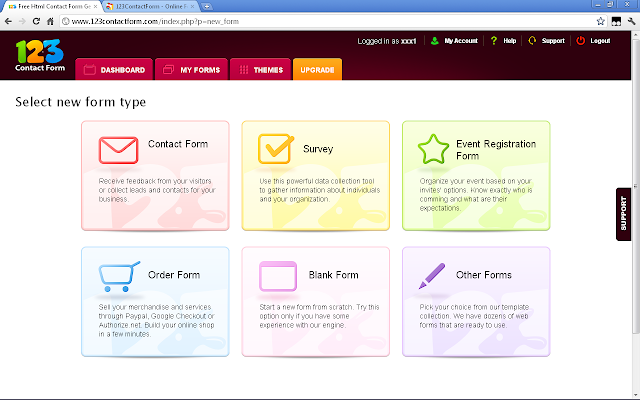
Easily Create Online Forms & Surveys With 123ContactForm

123contactform.com lets you create any kind of contact form, event registration form, online surveys and order types of forms easily without any technical expertise.

It is a cloud based free HTML form generator and a very useful tool if you like adding a simple or complex form online on a web page. You can prepare a survey for organization, or for your website, company, for gathering leads from potential customers with a contact form, selling services and goods without a shopping cart or for any other online form requirement you have.

Some of its main functionality and features include:

You can build any HTML contact form, survey, email form or online web form.

Provides you real-time form editor with drag and drop fields, you can change their properties, add fields for Google Maps, uploads, images, even HTML content etc.

Get instant email notifications like you can receive the content of your form or survey to multiple email addresses at once, create a rule and send your form entry to an email based on the value of a field, send a confirmation message (autoresponder) to each person who filled your form

You can connect with 3rd party applications like Google Docs, MailChimp, SalesForce, Google Groups, Yahoo Groups, VerticalResponse, Twitter. Provides you webhooks: deliver each form submission to a custom script of your choice.

Get paid through your online order forms. Enable one click payment integration with Paypal, Google Checkout and Authorize.NET. You can turn your web form into a shopping cart, use advanced calculations for coupons, taxes, discounts, post sale notifications to buyer

Provides you reports and charts. You can display your form entries as a chart. A picture. You can publish email forms and surveys on Facebook, WordPress, Blogger, Google Sites and any social media, blog or website platform etc.

Easily Encode And Decode HTML Code On Cloud

You can easily encode HTML on cloud to show it in the HTML pages a code instead of rendered HTML. You can decode HTML to convert it back to HTML code. Some had to convert HTML code to encoded HTML so that it can me shown as code in web page and it was difficult to convert to one by one thus this free cloud app.

Continue reading Easily Encode And Decode HTML Code On Cloud

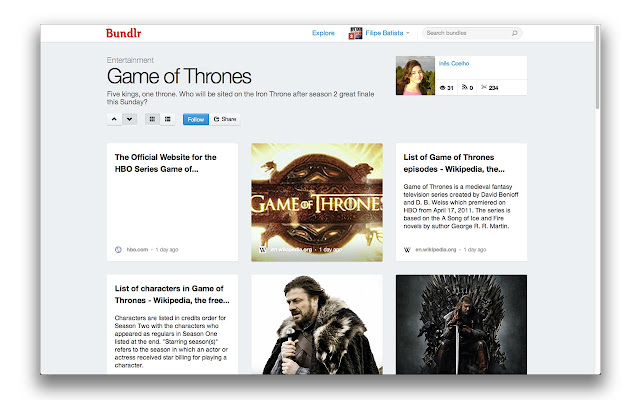
Organize Your Web World By Creating Topics, Pages With Photos, Videos, Tweets, Documents & More

Organize your world of web. Create categories and topic pages including photos, videos, sharings like tweets and also documents to keep your online life well organized and share anything with anyone at anytime.

This article is on a bookmarking cloud web service called Bundlr.com. You can start simply signing in with Facebook, Google or Twitter. Bundlr is build for online curation: clipping, aggregation and sharing web content easily. Using this cloud service you can cover real-time news, wrap up an event or build a page with the most relevant content on your favorite topic.

You may bookmark the service or install its chrome bookmarklet from web store. Other than from its homepage you can install other bookmarklets like may be if you are Android user or iTunes etc.

Using Bundlr browser button, you can clip content while web browsing and each bundle has its own public webpage which you can share with everyone.

News Headline Ticker With Typing Style Slider For WordPress

News Headline Ticker is the new typing style text slider for WordPress. It allows you to display your recent news headline as typing style slider on your website. The plugin is designed for online news websites. It adds a new post type you can use for creating news posts and then you can show them in a sliding typing style.

Install and activate the plugin then follow the given steps:

  1. Visit admin area dashboard and you will see a new post type is added.
  2. Click on the new menu item “News Headline” and create your head line news.
  3. Just copy and paste ” if(function_exists('newsHeadLineTkr')){headLinePost();} in the template code or [News-Ticker] in the post/page” where you want to display news head line.

Create Special Content With New WordPress Light Shortcode Generator

Light Shortcode is the new TinyMCE shortcode generator for WordPress sites. The plugin provides you shortcodes for Button, Icon, Box, Highlight, Divider, Toggle, Google Map, Accordion, Pricing Table, Tabs, and Grid etc.

light-shortcode screenshot 1Light Shortcode button

light-shortcode screenshot 2Example shortcode (Price Tables)

Simply install and activate Light Shortcode plugin. Upon activation it adds a new TinyMCE button in WordPress visual editor. You may use the button and insert special looking content while creating new or editing an old blog post, page or any other custom post type etc without painful of manual coding. Check out its Live Demo & Documentation.

Easily Add Expand & Collapse Functionality To Any WordPress Theme

Expand + Collapse Funk is the brand new WordPress application the allows you to easily add expand and collapse functionality to any WordPress theme. The plugin is beautifully simple UI. It simply saves your space by generating hidden content.

Feautres

  1. Beautifully simple UI
  2. Easily integrate images and YouTube video
  3. Direct link to images/YouTube videos
  4. Quick placement of expand+collapse items
  5. Use on pages or posts (or copy and paste the code to use in theme templates)
  6. Use HTML markup inside the hidden content area

http://www.youtube.com/watch?v=fiNUqZxFwNA
With this new plugin you can easily place hidden content and a link that reveals the content. The functionality is widely used across world wide web to free up space on a page or to place semi-important content into posts. There is no limit to the length of the hidden content. You can include images, YouTube & Vimeo videos or anything else you like.

expandcollapse-funk screenshot 1Expand+Collapse Funk creates a custom tinyMCE icon in the visual editor for very easy use.

expandcollapse-funk screenshot 2The Expand+Collapse Funk modal

expandcollapse-funk screenshot 3Example of very simple YouTube video integration

expandcollapse-funk screenshot 4Example of generated links on a page

expandcollapse-funk screenshot 5Example of expandedl inks showing hidden content.
Simply install and activate the plugin. Upon activation the plugin adds a new TinyMCE button in WordPress visual editor. You may create or edit a page or post to access the ‘Expand Collapse Funk’ tinyMCE button then input the necessary fields, click insert and you are done.

Independently Encrypt And Decrypt Text Anywhere On Internet

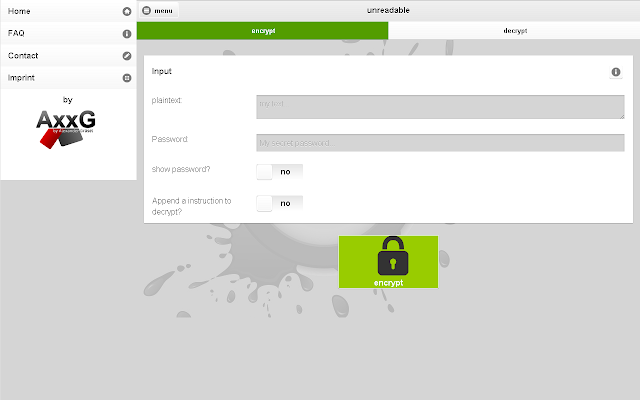
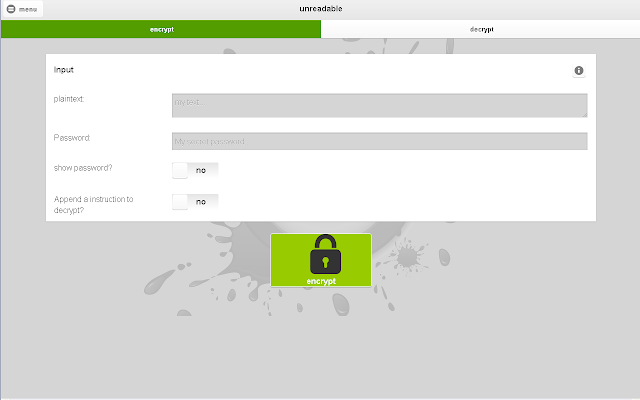
Unreadable is a free web service, as the name says it all it lets you easily encrypts and decrypts text independently of the transport (e-mail, Whatsapp, Facebook and co) and the platform (PC, smartphone, television, etc.). Using this awesome app you can secure all of your text and passwords.

All encrypted texts can be sent by Emails, USB / CD / DVD / Bluray (stored in a file), Facebook, Google+, Twitter, … WhatsApp, ChatON, Hangouts, Hike, whistle.im, Skype. It is compatible on all popular platforms like Android (Google Play, Amazon Appstore, Samsung Hub), iOS, BlackBerry, FireFox OS, Chrome OS, Windows, Linux, Mac OS X, … everything with a browser.

There many other functions this app does are:

  1. 256-bit key length
  2. Offline Availability
  3. Different languages: German, English
  4. Protection against Data analysis-tools
  5. Provides you fast and effective encryption and decryption of texts
  6. Strong symmetric encryption algorithm (Advanced Encryption Standard short AES)
  7. Platform independent The app works on the PC, the smartphone, camera, TV, etc. … everything, that has a browser;)

Usage Instructions:

You can install its Chrome Extension or use the service directly by visiting Unreadable.de

Transmitter:

  1. Write text
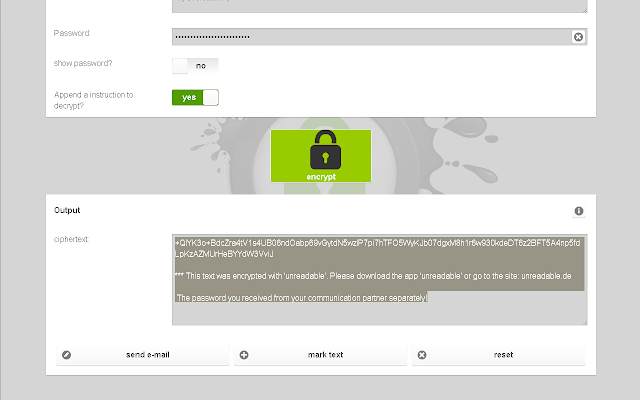
  2. Think out a password and encrypt the text
  3. Send encrypted text
  4. Communicate the password to the communication partner by telephone, letter or in direct conversation

Receiver:

  1. Visit www.unreadable.de or download the app
  2. Copy encrypted text into the app
  3. Enter the password and decrypt the text

Playing Old Days Super Mario Games On Your Chromebook

Mario is a popular old days video game. Mario is a fictional character in the Mario video game franchise by Nintendo, created by Japanese video game designer Shigeru Miyamoto. Serving as Nintendo’s mascot and the eponymous protagonist of the series, it has appeared in over 200 video games since his creation. It is said by many to be the most famous character in video game history. Mario games, as a whole, have sold more than 210 million units, making the Mario franchise the best-selling video game franchise of all time.

Now this article is on Best Super Mario Games chrome app available as free download at Google Web Store. This is a selection of Best Super Mario Games Online, including Mario Flash, Mario Star Scramble, Paper mario and much more for your Chrome/Chromebook’s personalized homepage.

You can play all games directly in your browser greatest hits, cool classic or innovative Super Mario games, like Super Mario`s Adventure 1 and 2, Super Mario Flash 1 and 2, Super Mario Bros. Star Scramble 1, 2 and 3, Paper Mario World and there are many more.

Exporting Jetpack’s Contact Form Feedback Data To CSV File

By default WordPress doesn’t provides you option to export Jetpack’s feedback data to CSV. Butby using Jetpack Feedback Exporter you can export Jetpack Contact Form Feedback data to a csv file. It enables you to select the form you like exporting, then click export, that’s all. The plugin is addon for Jetpack by WordPress.com plugin.

Plugin Features:

  • Export all data
  • Export into CSV
  • Opens easily in excel
  • Contains header tags
  • Optional Date

Exporting FeedBack Forms:

For exporting your Jetpack Feedback forms visit your admin area Dashboard -> Tools -> Feedback Exporter and choose desired form to export, you can include date, then finally click export and you are done.