Category Archives: Free Education

Enrich Email Experience By Embedding Shared Content Right Below Emails You Send Or Receive

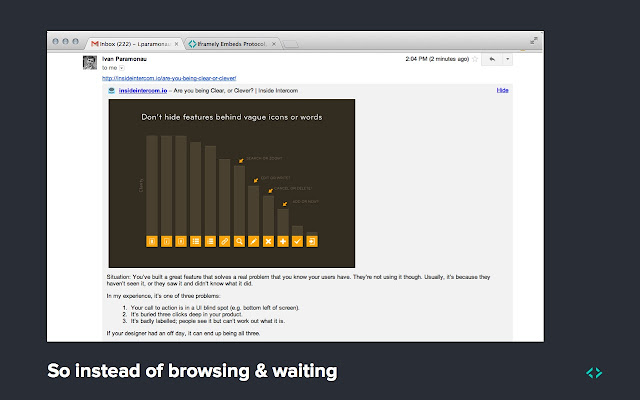
You easily or you can say automatically enrich your email experience by auto-embedding shared content right below your emails. Iframely for Gmail allows you to watch embedded videos, view images and read articles directly in your Gmail. Works same as oEmbed works in WordPress.

How it works ? After you open your gmail account, this app automatically searches web links present inside incoming mails and then everything gets visual. It ignores all emails you get from marketing bots etc and shows only content from real humans not by bots.

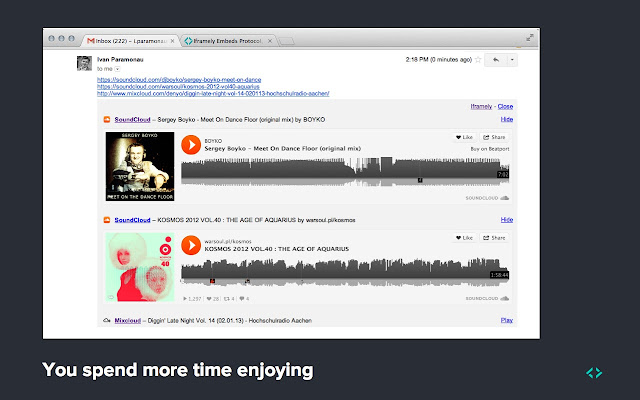
Another useful function this chrome app provides you is when you compose any email, it automatically detect photos in URLs which you are sending to your friends etc and it puts an image inside your emails for convenience of your peers.
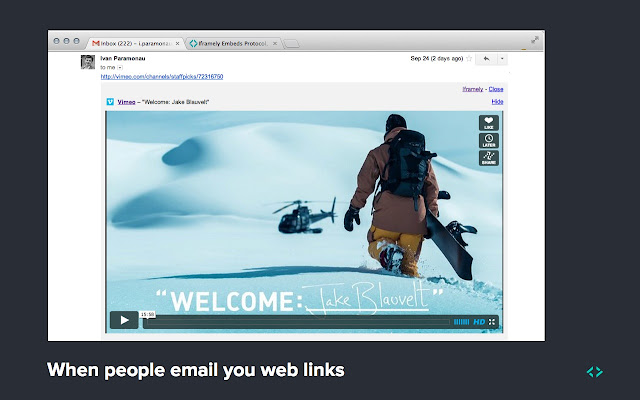
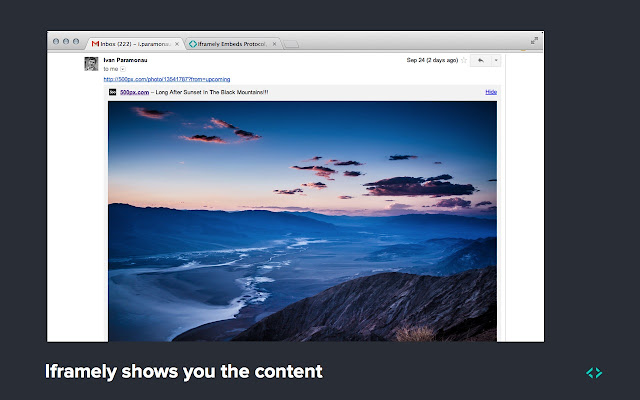
It works same on embedding videos, sound and more but don’t worry it does not autoplay any videos and disrupt your productivity. You may click to open if required. The application is powered by Iframely Open Source API and is secured by http://iframely.com/qa.

Enhance WordPress Multisite Network Administration

You can make your multisite management better by adding more useful functions for super admins. Multisite Enhancements is the new WordPress plugin that allows you to enhance the network admin area by adding some new useful functions to it like the plugin adds several useful items to the multisite ‘Network Admin’ admin bar, it enables ‘Add New’ link under the Plugins menu only for Network admins (super admins), shows which blogs have which plugin and theme active and much more.

Continue reading Enhance WordPress Multisite Network Administration

How To Enable Google+ Authorship On Per Post Basis In A Multi Authored WordPress Site?

GooglePlus Multi-Authorship provides a straightforward solution to WordPress users, it allows you to properly add Google+ Authorship markup to the head of each post & page on a multi-authored website.

The plugin follows recommended use of rel=”author” tag and points author name to its Google+ profile in search results

  1. The appropriate author’s Google+ profile is used for each single post and page.
  2. The plugin adds both the rel=”author” and rel=”publisher” on single posts and pages.
  3. The plugin adds only the rel=”publisher” link tag on the home page, front page and archive pages
  4. You can set a default Google+ profile to be used as a fallback if there’s no Google+ profile specified for an author in his WP user profile settings.

GooglePlus Multi-Authorship Plugin

How to use GooglePlus Multi-Authorship?

Install and activate GooglePlus Multi-Authorship plugin.

After activation each author should add their Google+ profile URL in their WP user profile settings.

Visit your admin area Dashboard -> Settings -> G+ Multi-Authorship admin page and here you can provide a default Google+ author profile below. This will be used when an author has not added a Google Plus profile in his/her WP user profile settings. Leave it blank if you don’t want to use a default.

Easy Terminal Commands For Installing Adobe Flash Player In Ubuntu Linux 12.04

Adobe flash player allows you to browse multimedia content online like videos, animations , some flash games and other rich media content etc etc. It supports almost all operating systems like Linux, Mac, Android, Mobile OS, Solaris etc. You can easily install in your Ubuntu Linux, right from terminal by following few simple steps given here.

Continue reading Easy Terminal Commands For Installing Adobe Flash Player In Ubuntu Linux 12.04

New AJAX Powered Search Keyword Analyzer & Tracker For WordPress

With new Ajaxy Search Keyword Analyzer & Tracker, webmasters can track live searches happening on their website, they can track the search keyword and can easily get to know what website visitors are looking for in their website. You can easily get started, simply install and activate Ajaxy Search Keyword Analyzer & Tracker plugin. Upon activation the plugin adds a dashboard widgets showing you all search stats and reports.

Continue reading New AJAX Powered Search Keyword Analyzer & Tracker For WordPress

Enable Members To Vote For Several Topics In Your P2 Based WordPress Blog

P2 Post Feedback is the new WordPress plugin for P2 Theme users. The plugin enables all registered users in your website to vote for several topics. All you need to do is install and activate this new P2 Addon plugin in your WordPress based website and you are done. See the following screenshot.

Continue reading Enable Members To Vote For Several Topics In Your P2 Based WordPress Blog

What Makes Chromium Different From Google Chrome ?

Google Chrome is built upon Chromium open source project, Google chrome is packaged and distributed by Google officially. In-short Google Chrome is a commercial and closed source product by Google which is based on open source Chromium project. Chromium, being open source is mostly used by Linux operating system users. For example: Chromium is available in Ubuntu repositories and one can download it from Ubuntu Software Centre, it maintained by Ubuntu developers and goes through their stable release and update process, same thing happens with other Linux distros and this makes Chromium more compatible for Linux based operating systems.

Another key difference between Google Chrome and Chromium is chrome is red where as Chromium is blue in color ;-) You should know that both web browsers share majority of code and features, only a few minor differences makes them a little bit different from each other.

Chrome & Chromium

For creating Chrome from Chromium, Google uses its source code and adds following features:

  1. In-built print preview and print system
  2. Google name and a different logo trademarked
  3. In-built PDF viewe with proprietary license and code
  4. Auto-update and tracking system called GoogleUpdate
  5. Integrates Flash Player with proprietary license and code
  6. Opt-in option for users to send Google their usage statistics and crash reports

By default Chromium only supports Vorbis, Theora and WebM codecs for the HTML5 audio and video tags whereas Google Chrome supports these as well as AAC (patent-encumbered) and MP3 (formerly patent-encumbered). Although there are more differences but these are the technical ones which affect user user experience.

Easily Integrate Superb Vimeo Or YouTube Video Quality In WordPress Widget Position

Vimeo Master

Vimeo Master is a powerful and outstanding WordPress plugin that allows you to integrate superb Vimeo Video Sharing Network into your WordPress site. The plugin uses minimal html5 code (with no javascipt or Ajax) for fast page load times and gives a completely professional look. Great for professional video presentations for business, design, arts, etc. Looks great inside WordPress content like pages, posts and other custom post types with its shortcode framework implementation. Provides you full control over Auto-Play, Video Loop, Video Color and Video Size to match your template. Demo.

Continue reading Easily Integrate Superb Vimeo Or YouTube Video Quality In WordPress Widget Position

Now Easily Create & Organize Documentation For Multiple Products In WordPress

Organized Docs is the brand new WordPress plugin you can use for creating beautifully organized documentation for multiple products organized by product and subsections within each product. After activation the plugin activates a new new post type ‘Docs’ in WordPress admin section. You can create documentation for multiple items like multiple software product and organize them neatly, by product. Its main admin section page (Dashboard -> Docs -> All Docs) lists all your products. Clicking on each product directs you to the docs only for that particular product. You can organize your products into subsections and they lists each individual article in that docs section.

Continue reading Now Easily Create & Organize Documentation For Multiple Products In WordPress

Some Common Web Browser Errors And Their Meanings

Phishing (Web Forgery) & Malware Warnings: No matter what web browser you are using, it regularly downloads a list of dangerous websites and when you try connecting to a website on this list, the error is displayed.

Phishing Error

Certificate Error: SSL certificate error or security certificate error indicates problem with HTTPS encryption. It comes only when you try accessing website using HTTPS.

SSL Error

404 Not Found: The error is displayed when you try accessing a web page which is not present anywhere. The error shows up on wrong URLs or when you type incorrect website address.

404

Unable to Connect: The error comes when your browser successfully contact its DNS servers and identifies that there should be a website but it did not get any response from the servers when it tries to connect. Usually happens when your internet connection is down.

unable to connect

Server Not Found: The message is dsplayed when your web browser could not find the website you’re trying to access. Sometimes when you mistype a web address or when you try to connect to any website which doesn’t exist, or when your DNS server is down, or may be your firewall, proxy, or due to some other misconfigured settings.

server not found

Top 5 Black & White Themes For Chrome & Chromebook

Here are some of the best Google chrome themes with mostly black and white color used in them but they all are beautiful and used by a vast number of Google chrome users world wide. Each theme provides you a different taste and style like Slinky Elegant is designed to be smart and simple, Charlotte Ronson looks classic, Vince is a unique concept in fashion, offers you a complete line of luxe staples with clean lines, rich fabrics, and intricate,Tiësto is one of the most well-known and biggest artists in electronic music.

Continue reading Top 5 Black & White Themes For Chrome & Chromebook

How To Use Underscores Instead Of Dashes In WordPress Permalinks ?

By default WordPress use dash (-) for separting words in permakinks (URL slugs) but you can easily change it to underscores (_). There are two methods. First you can do this by using a plugin or you have to paste some code you your site’s standard plugin or theme’s function.php file.

Continue reading How To Use Underscores Instead Of Dashes In WordPress Permalinks ?

How To Delete Multiple WordPress Themes At Once ?

It is possible to delete multiple plugins at once but by default WordPress doesn’t provides you any feature for deleting multiple theme at once. Bloggers and webmasters, they add multiple themes for testing purposes but it becomes very time consuming job to delete themes one by one from admin area dashboard, the only way of deleting all themes at once is deleting all times directing from wp-content/themes directory via FTP or cPanel.

Continue reading How To Delete Multiple WordPress Themes At Once ?

How To Extend WordPress Automatic Background Updates For Major Releases ?

From WordPress 3.7 updates are more reliable and secure with many different checks and safeguards. It comes with fine-grained update controls for developers and systems admins. Now WordPress runs updates automatically in background while and at the same time you can perform other tasks but as said by the developers you will be needing to update from 3.7 to 3.8. This tutorial is on new WordPress plugin called Background Updates for Major Releases. The plugin extends WordPress automatic updates to major releases and you can keep them running automatically in background like other light updates.

Continue reading How To Extend WordPress Automatic Background Updates For Major Releases ?

Automatically Test Your WordPress Site Compatibility For New Updates

Since WordPress 3.7 updates, most of the WordPress installations are able to run and apply all new updates in background. Background Update Tester is the new WordPress plugin that tests your WordPress site for compatibility issues and explains if problems are found.

Continue reading Automatically Test Your WordPress Site Compatibility For New Updates

How To Stop WordPress From Running Updates Automatically ?

Since new WordPress 3.7 update, a typical WordPress site is able to automatically update itself. It runs update in background whenever there is any new minor/security release is available. But this might cause some problems for some site owners, there are many reasons. Site owners may wish to disable this new WordPress functionality. Here’s the solution.

Continue reading How To Stop WordPress From Running Updates Automatically ?

Powerful Multiple Gmail Account Checker For Chromebook

Earlier we discussed about Gmail Offline chrome app that allows you to automatically synchronize all you Gmail messages and then you can read, write, search and do more with your Gmail messages, all offline. We also discussed about popular Official Gmail App for chrome. Now this tutorial is on another cool chrome app called Multiple Account Checker for Gmail. As clear from its name, the app allows you to read all your Gmail and Google Apps emails from one tab so that you can reduce your tabs and save memory.

Continue reading Powerful Multiple Gmail Account Checker For Chromebook

WordPress 3.7, Now What New Plugins Should To Be Created ?

As we have already discussed about the new features of WordPress 3.7. This new update is loaded with new cool features but at the same time it will create some problems for some webmasters and site owners. Likewise now in WordPress 3.7 there is no need to lift a finger for making maintenance and other security updates as it automatically updates itself, similar to Chrome. This feature is good for most of the bloggers running their personal blogs. But at the same time it might cause big problems for webmasters who edited WP core or theme or working on some php code of their website as they might loose some important edits without prior any notification etc. So first of all a plugin should be created for disabling these automatic updates, as that would be very useful for probloggers and webmasters working on their client websites etc.

Continue reading WordPress 3.7, Now What New Plugins Should To Be Created ?

How To Use Your Android Device As Wireless Router ?

You can easily use your Android device, may be your Android Phone as an ad-hoc wireless router. HotSpot allows you to use your Android phone or tablet as a temporary router, this way you can connect your devices with each other. The app is easy to use, all you have to do is install the app from Google Play then get started by following given steps.

Continue reading How To Use Your Android Device As Wireless Router ?

Popular Racing Games For Google Chrome & Chromebook

Here are a few popular games you can play in Chrome. The post includes various popular car racing games, popular motocross, skating and truck wars etc.

Downhill Jam

You can ride your skateboard down the busy streets of the city avoiding obstacles and collecting bonus on your way.

Motocross Nitro

American Racing 2 3D

Traffic Talent

Need for Speed World

SKiD Racer


New Robin Thicke’s Blurred Lines App For Your Android Device

Now you can easily listen to overpopular summer hit “Blurred Lines” by Robin Thicke in your Android Device. Robin Thicke – Blurred Lines Nebulosa Software App allows you to enjoy the soundboard of “Blurred Lines” by Robin Thicke feat. t.i. & pharrell. You can enjoy this worldwide hit, play its best parts, video, set it as ringtone or as notification (SMS) etc. It is optimized for tablets too.

Continue reading New Robin Thicke’s Blurred Lines App For Your Android Device