Category Archives: Homeschool

How To Burn Any ISO File To CD/DVD On Ubuntu?

Insert blank CD/DVD into your burner. A ‘CD/DVD Creator’, ‘Choose Disc Type’ or ‘Blank Disc’ window might pop up. Close it.

burn a DVD on Ubuntu 1

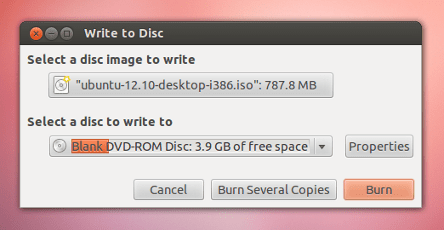
Now look up for the downloaded ISO file in the file manager, right click on the ISO file and click ‘Write to Disc’:

burn a DVD on Ubuntu 2

Where it says ‘Write disc to’, you might have options like ‘File image’ as well as your CD drive. Select your CD drive.

burn a DVD on Ubuntu 3

Now select write speed. For burning an Ubuntu Live CD it is recommended to write at the lowest possible speed. Finally, start the burning process.

After it finishes, verify that your CD now gave multiple files and folders and not just the ISO file you have burnt.  If you can see multiple files and folders in the CD then congratulations, you have successfully completed the ISO burning process.

Enable 3 Menu Locations In New WordPress Admin Toolbar

Admin Toolbar Menus, a new WordPress plugin add 3 new menu locations to the WP toolbar and you can easily create your own custom toolbar menus with default WordPress menus functionality present in Dashboard -> Appearance -> Menus page. It supports multi level navigation and works seamlessly with existing toolbar menus.

Continue reading Enable 3 Menu Locations In New WordPress Admin Toolbar →

Sticky Container Of Social Media Icons In Your Favorite Colors For WordPress

Sticky Social Icon is a simple sticky container of social media icons glued on the right side of your website. The container provides you animated social icons with css3 transitions and transform rules with different color code. To start, install and activate the plugin in your WordPress installation.

Continue reading Sticky Container Of Social Media Icons In Your Favorite Colors For WordPress →

How To Set Default Admin Color Scheme For All Users In WordPress?

Now there are many plugins you can use for transforming your WordPress admin section in your own colors. Now you know how to create your own color scheme, you know how to change frontend admin bar color as per admin color scheme selected in backend, you know how to randomly change color schemes as soon any new post is published or an old post updated and there are a lot more tips, tricks and plugin.

Continue reading How To Set Default Admin Color Scheme For All Users In WordPress? →

How To Easily Install Android On Your Laptop?

The tutorial is about installing Android on your laptop. This is possible for average Linux users and you can do it yourself without any coding skills required.

To Start, first thing you need to do get latest Android download so refer to Androidx86 project download page, Lookup for section RC 1 and download Android ISO for your laptop/tablet or netbook ISO and as you can see there are a few options available:

android download

Second step is to copy it to a flash drive. You have the ISO file and now its time to write it on a USB drive so that you can boot from it on your laptop.

You can create a flash drive by using UNetBootIn, it is an open source cross platform app about which we have already discussed. If you are using Ubuntu Linux the refer to its tutorial we posted before other wise you may install it on Windows, MAC etc by refering to its webpage here. Windows users can also use Linux Live USB Creator, best for windows users.

Copy the contents of the ISO to a flash drive, unlike to other ISOs, this can be done in just 1 GB USB drive.

Finally, Third step is to boot your laptop on USB. Put your USB and boot your laptop from USB drive and follow/select from on screen instructions.

This slideshow requires JavaScript.

It provides you various options for partitioning, dual-botting etc. Check out the Androidx86 installation guide here.

Installing & Using UNetbootin (Bootable Linux USB Creator App) On Ubuntu

UNetbootin is an opensource cross platform application that provides you functions to easily create bootable Live USB drives for Android, Ubuntu, Fedora and other Linux distributions without any burning a CD. The application is compatible with Linux, Windows and Mac OS X. Also you can either let UNetbootin download one of the many distributions supported out-of-the-box for you, or you can supply your own Linux .iso file if you’ve already downloaded one or your preferred distribution isn’t on the list. For installing UNetbootin in Ubuntu you have to give a few simple commands from terminal.

Continue reading Installing & Using UNetbootin (Bootable Linux USB Creator App) On Ubuntu →

How To Switch To Outlook.com With New Gmail Import Tool?

It is not always easy to switch between e-mail provider but the new Outlook.com’s Gmail import tool looks a bit different from past tools. This tutorial is on new Gmail import tool and here we will discuss how to switch to Outlook.com using this new tool.

To start open your Outlook.com account and follow the given steps:

Step-1 Click the gear icon and choose “More mail settings”

Step-2 Under “Managing your account,” click the “Import email accounts” and then Google. (Here is the direct link to Gmail import tool)

Step-3 From import tool page, click the Options link, By default it imports your messages to existing folders and automatically creates new directories for any custom Gmail labels you used in Gmail but still you can decide how you want to import them. Finally, click Start.

Step-4 It will prompt you to authorize Outlook.com for accessing your Gmail account, authorize it. It takes some time depending upon the quantity of messages are to be imported. After it finishes you get an e-mail with all import results.

How To Enable Any Shortcode In WordPress Comment Form?

The tutorial is on activating WordPress shortcodes functionality in comment’s form so that you can enable your commenters to use some shortcodes (assigned by you) while writing any comments on your website. Shortcode in Comment is a handy plugin for this. The plugin lets enable decide which shortcodes you would like to enable in the comment form.

Continue reading How To Enable Any Shortcode In WordPress Comment Form? →

Displaying Author List With Bubble Of Total Posts In WordPress

New Author List by buffercode.com lets you display your blog author list with an hover effect that displays a bubble showing number of posts they have written on your website. Author List is a WordPress widget plugin with following features:

  • You can show the Author list through widget.
  • On hover displays author image, the total number of post, user name and gravatar image will be displayed.
  • Site admin can set the limit of authors to display, Gravatar image size to be 24×24, 48×48 or 96×96 pixel and customize the widget title name.

So what all you have to do is install and activate this new WordPress plugin. Upon activation visit your admin area Dashboard -> Appearance -> Widgets page, drag ‘Author List’ widget to sidebar and set Custom Name, Number of Authors to show, Set Author Image Size.

Enable Website Visitors To Listen Radio Of Country Selected By You In WordPress

Now very easily you can add a simple widget in your WordPress site and enable your website visitors to listed to the radio of country selected by you. You select the country and your website visitors can themselves change to various radio stations and listed to music on your website. The widget is fast and loads up very fast.

Continue reading Enable Website Visitors To Listen Radio Of Country Selected By You In WordPress →

Easily Find Almost Every File Format On Internet

TechFileFormat from from Ace.Net.Nz provides you an online utility to find almost any file format. It provides you A to Z alphabet links which when clicked opens up a page showing file format with their full forms. To start visit this URL and you can navigate by clicking alphabets.

Continue reading Easily Find Almost Every File Format On Internet →

How To Create Your Own WordPress Admin Color Scheme?

Every week new plugin for admin color schemes are populating WordPress plugin repo. Today we are discussing about another interesting plugin that lets you create your own admin color schemes. The plugin is an official WordPress.Org release which enable you to visually create new color schemes with easy color picker.

Creating new color scheme of your favorite colors:

First install and activate Admin Color Schemer plugin, upon activation visit your admin area Dashboard -> Tools -> Admin Colors page and selet colors

You can select color for Base, Icon, Highlight and Notification. You can also click ‘ Show Advance Options‘ link present in there to customize every admin color like: Button, Text (over Base), Body background, Link, Link interaction, Checked form controls, Menu background, Menu text, Menu icon, Menu highlight background, Menu highlight text, Menu highlight icon, Menu current background, Menu current text, Menu current icon, Submenu background, Submenu text, Submenu alt, background, Submenu text interaction, Submenu current text, Bubble background, Bubble text, Bubble current background, Bubble current text, Menu collapse text, Menu collapse icon, Menu collapse text interaction, Menu collapse, icon interaction, Toolbar avatar frame, Toolbar input background.

New Twenty Fourteen Child Theme To Visually Customize Each Element Color

Few days back we discussed about Tweaking Twenty Fourteen WordPress Theme, Making It Full Width, Center Aligned, Etc Etc. Now this tutorial is on new WordPress theme. Anjirai, is new child theme for new Twenty Fourteen. Anjirai is a Tamil word which means a beautiful Wing. With this new awesome WordPress theme you can customize every element’s color of your Twenty Fourteen WordPress theme.

Continue reading New Twenty Fourteen Child Theme To Visually Customize Each Element Color →

Automatically Check For Duplicate Post Titles In WordPress

Keeping similar title in more than one blog post is not good for SEO. Duplicate titles, WordPress allows them by default and that is why many a times it happens that by mistake you give same title to multiple posts and you are not aware of that. The functionality is good because you can keep multiple posts with same title and WordPress will automatically generate unique URLs for duplicate posts which is very useful for hobby bloggers but not for pro-bloggers.
Continue reading Automatically Check For Duplicate Post Titles In WordPress →

Easily Prevent Duplication Of Tabs In Google Chrome

Prevent Duplicate Tabs, a Google Chrome App. that tells everything from its name and that all what it does. The extension closes old tabs and also prevents you from opening new ones. Tab addiction is something that most web surfers have and many a times people don’t even remember what that have opened thirteen tabs back.

Continue reading Easily Prevent Duplication Of Tabs In Google Chrome →

How To Export Featured Images (Post Thumbnails) In WordPress?

A big headache when exporting your WordPress site content is to take along your site’s featured images. Earlier we discussed about exporting your site menus and now this tutorial is on how you can easily export featured images. By default WordPress allows you to export all text content but there is no option for exporting featured images assigned to your blog post, pages and custom post types etc.

Continue reading How To Export Featured Images (Post Thumbnails) In WordPress? →

Free Online Flashlight Lamp That Instantly Turns Your Screen At Its Brightest

Free Online Flashlight or you can say it a night lamp. What all it does is provides you instant flash light in a button click and next click turns it off. Might be useful if you are working in a dark room on your laptop and for some time need a little flash of light or whatever.

The bulb simply turns your computer’s screen on it’s brightest setting for producing a less intense, soft light to set a mood or glow.

Continue reading Free Online Flashlight Lamp That Instantly Turns Your Screen At Its Brightest →

BBM Is Now Available For Android & iPhone iOS Users For Free

Popular BlackBerry’s BBM messaging service and the best way of connecting and sharing instant messages, pictures and more free, in real time is also here to accompany popular mobile OS of our times. Recently, BlackBerry announced that they will be releasing BBM for iOS and Android and now you can download it from their website.

Continue reading BBM Is Now Available For Android & iPhone iOS Users For Free →

Shardul Pandey Talks To Gabriel Lynch

Shardul Pandey Talks

Shardul Pandey: I welcome you Gabriel at SANGKRIT.net, please tell our netizens about yourself, your story.

Gabriel Lynch: My name is Gabriel Lynch. I’m an independent Australian musician and songwriter. Music has been a big part of my life since I was a very young. My parents encouraged me to take up the violin when I was five years old. Shortly then I also became a member of the Australian Boys Choir. When I was 8, my dad – a music scholar and classical guitarist – showed me three chords on the guitar and from then onward, I was writing my own songs. By age 13 I had played my first show in a pub in my hometown of Melbourne, and I have never stopped performing since then.

I’m now 26 years old and I have spent most of the last three years making my living out of touring, performing and selling my own self-funded CDs. I’ve played in countries all over Europe, Australia and Asia and last year I was lucky enough to even perform at a festival in Singapore, alongside my heroes Elbow, The John Butler Trio and Architecture in Helsinki.

I’ve worked along some incredible musicians of various styles and genres. For the last three months I was working my improvising chops as a jazz singer with a small band at Bangkok’s renowned music hub, Brown Sugar. I have also been working alongside Australian DJ and composer, Robbie James, to create a new album of electronic music under the name Stray Nation.

At the present time, I’m working as a musician for hire in Bangkok. I’m also in the process of preparing to create a new record of my own (after having great success with my last EP, Dependent State). The finance for my new album will be raised via an online crowdfunding campaign which is a very new concept to me. But it’s also very exciting because I’m using that campaign to challenge myself as a songwriter – everyone who pledges has a chance to choose a song title and topic that I must then write and record for YouTube within two weeks!

Gabriel LynchShardul Pandey: What makes your endeavors unique ?

Gabriel Lynch: The thing that makes my endeavours most unique is the fact that I am totally independent. That means that every tour, every record I make, every project I undertake is self-funded and produced. The other thing that perhaps makes my approach to my work unique is that I am always trying new ways to expand my own horizons. Beyond my own releases and performances, I also love to collaborate and play outside of my comfort zone. In the near future I’ll be releasing a joint electronic music project with Melbourne producer/dj Robbie James called Stray Nation. And, of course, in raising funds for my new solo album, I am asking my audience to help me with the songwriting process by suggesting song titles and topics. They get the opportunity to do this when they pledge their support. I think this brings in a new level of online audience participation and I think that interaction (which is one of my favourite things about playing live) is crucial to creating art that is all the more personal for my followers and supporters.

Shardul Pandey: On what musical projects you are working on? What can we expect from you in the next few years ? Any long-term goals?

Gabriel Lynch: As I mentioned, my main project at the moment is the songwriting exercise/crowdfunding project for my next album. This is a big challenge for me as I will have to pour out a lot of music in a short period of time. I’m hoping to then incorporate the best songs I come up with into the new album. The new album will be recorded in 2014 and will be followed by tours in Asia, Australia and (hopefully) the US for the very first time. I’d be lying if I said I had any strict goals. But my main ambition through everything I do is to make more friends, expose my music to more people and find those individuals who connect with what I do. Music is about sharing and I hope to do that in every way possible. That means playing and performing at every opportunity, continuing to write and create new material for my followers, and collaborating with other artists.

Shardul Pandey: Would you like to share the experience of your first performance?

Gabriel Lynch: I was about 13 years old when I first played live. I was invited by a small collective to participate in an open mic night at a pub in Melbourne. It was a very small affair, but I remember being deeply excited because it was my first time performing my music in front of strangers. It was also exciting to be inside a pub! Of course, my mother had to accompany me to many of my shows when I was under the legal drinking age (18 in Australia). But she was really supportive and ended up taking me to loads of shows throughout my teen years.

Shardul Pandey: What is your foremost experience as an artist ? Any favorite moment you would like to share?

Gabriel Lynch: There are a great many to choose from. I think the best moments for me when I receive words of comfort or encouragement from strangers. That sometimes happens when an audience sings along with my songs. It happens when somebody sends me an email to say ‘thank you’ for a song that touched them in a particular way. Perhaps the one experience that comes to mind first was my début performance at Singapore’s Esplanade Theatre. The audience was incredibly enthusiastic and were so excited by the opportunity to sing harmonies with me (something I like to do when I play live – the results are often mixed). They really gave it their all and they were so quick to approach me afterward, one at a time, to introduce themselves and say hello. I think I met a couple of hundred people that night and I’ll never forget it!

Shardul Pandey: Any other creative mediums you work in?

Gabriel Lynch: I stick with music mostly. Although that’s a broad statement. I have several projects on the go and I work as a hired gun for jazz ensembles and cover bands to keep myself busy. But I have recently started writing online for a handful of music websites. The most popular column I have is for Philippines’ DIG Radio site. The column is entitled “All Musicians Go to Hell” and I use it as an opportunity to talk about all things music: performing, music criticism and analysis, tips for other musicians. The fun part is using humour to convey my message.

Gabriel Lynch

Shardul Pandey: How do you best describe what music is to you?

Gabriel Lynch: I think I’d describe it as expression. Simple as that. When I hear music that makes me feel something, irrespective of what, and irrespective of genre, that says to me that the composer has achieved something special.

Shardul Pandey: Who were your biggest musical influences ?

Gabriel Lynch: I’m extremely fond of many different musicians from different backgrounds and periods of history. My favourite contemporary artists are groups like Elbow, Radiohead, Ben Folds and Eels. But I also have a deep love of classical music (Debussy and Elgar are among my favourites) and jazz (Brad Mehldau is one of my heroes). But musically I find my experiences, meeting people and going through the trials of life are some of the best sources of inspiration.

Shardul Pandey: What songs get you moving ?

Gabriel Lynch: The uptempo numbers from Ben Folds Five are usually a good start for music to make you feel energised. Songs like “Kate” and “Song for the Dumped”. I also love Mutemath and their style of bluesy rock. It’s sophisticated and incredibly intense, but a lot of fun.

Shardul Pandey: Any plans for an international tour on your skyline?

Gabriel Lynch: Yes indeed. Once my new album is finished, I’ll be attempting to reach as far and wide as I can. I’ll start with Asia and my home country, Australia. But I’m hoping to get to the US for the first time. This will all take place midway through 2014.

Shardul Pandey: What you feel is your strength as a musician and how would you like to be remembered ?

Gabriel Lynch: Musically speaking? I suppose it would be my songwriting. I never really thought of myself as a singer, much less a guitarist. But I think I have the ability to express, through melody and song, the things I write about before lyrics even come into the equation. But what really matters, at the end of the day, is that I love working with other musicians. I think my best quality, therefore, is my approach to making music with others. I like to think I make friends of anyone I play along, and having that relationship opens you up to the possibility of creating something very unique and special.

Shardul Pandey: What advice would you give to newbie musicians?

Gabriel Lynch: Be honest in your music. Forget about being cool. Forget about playing the most current and popular style. Be honest and write and play the music that speaks to you. If you’re honest, people listening will be able to find it and that’s how you’ll reach them. That’s how you’ll grow a support base. And it will also make you happy.

Gabriel Lynch

Shardul Pandey: What is your web address, do you own a domain?

Gabriel Lynch: Yes, TheGabrielLynchBand.com. There are a few other places: Indiegogo Campaign, Gabriellynch.bandcamp.com, Facebook.com/gabriellynchmusic, Twitter.com/glynchmusic

Shardul Pandey: What is your ultimate message for netizens ?

Gabriel Lynch: I hope that your readers and all netizens who stumble upon this article and/or my music will give it a chance. Support doesn’t come in the form of money or page ‘likes’. But if you hear what I do, and if it means something to you, you can support me by sharing my songs with your friends. You can support me by following my news. And, most importantly, if you make it known that you like what you hear, then I’ll have all the more reason to come and perform for you the next time I hit the road. And I hope that will be sometime very soon.

This slideshow requires JavaScript.

Using Infogeek Admin Themes With New WordPress Color Schemes

Infogeek Admin Themes, another new admin area theme plugin that provides you three new color schemes based on WordPress 3.8 update. Simply install and activate the plugin, then visit your admin area profile page from dashboard user’s menu and you will be seeing three new color schemes: Infogeek Clear, Infogeek High Contrast and XTND ( Extend ).

Infogeek Clear:

Has the white as main color and blue as highlight. Is very clear theme for you backend, if you don\’ like so much the high contrast.

XTND ( Extend ):

A theme very close to the default theme but uses magenta instead of blue! Very nice looking variation!

Infogeek High Contrast:

Has a main color of green-blue ( like the sea ), secondary highlight colors of blue and black. Clear and helps much with distinction amount the different sections of the backend user interface.

Hello Pinky: Symbolize Childhood & Formative Years Of 90’s Generation In WordPress

Hello Pinky, another Hello Dolly style plugin that ymbolizes the childhood and formative years of an entire generation that grew up in the 90’s. The plugin shows up conversations between our heroes, WB’s Pinky and the Brain, appear in the admin notices section of the WP Dashboard – on every page.

Continue reading Hello Pinky: Symbolize Childhood & Formative Years Of 90’s Generation In WordPress →