Register/transfer domain names at http://system.sangkrit.net and mail to system@sangkrit.net to get your web/app made/managed as per the budget allocated.
News Headline Ticker is the new typing style text slider for WordPress. It allows you to display your recent news headline as typing style slider on your website. The plugin is designed for online news websites. It adds a new post type you can use for creating news posts and then you can show them in a sliding typing style.
Install and activate the plugin then follow the given steps:
Visit admin area dashboard and you will see a new post type is added.
Click on the new menu item “News Headline” and create your head line news.
Just copy and paste ” if(function_exists('newsHeadLineTkr')){headLinePost();} in the template code or [News-Ticker] in the post/page” where you want to display news head line.
Light Shortcode is the new TinyMCE shortcode generator for WordPress sites. The plugin provides you shortcodes for Button, Icon, Box, Highlight, Divider, Toggle, Google Map, Accordion, Pricing Table, Tabs, and Grid etc.
Light Shortcode button
Example shortcode (Price Tables)
Simply install and activate Light Shortcode plugin. Upon activation it adds a new TinyMCE button in WordPress visual editor. You may use the button and insert special looking content while creating new or editing an old blog post, page or any other custom post type etc without painful of manual coding. Check out its Live Demo & Documentation.
Expand + Collapse Funk is the brand new WordPress application the allows you to easily add expand and collapse functionality to any WordPress theme. The plugin is beautifully simple UI. It simply saves your space by generating hidden content.
Feautres
Beautifully simple UI
Easily integrate images and YouTube video
Direct link to images/YouTube videos
Quick placement of expand+collapse items
Use on pages or posts (or copy and paste the code to use in theme templates)
Use HTML markup inside the hidden content area
http://www.youtube.com/watch?v=fiNUqZxFwNA
With this new plugin you can easily place hidden content and a link that reveals the content. The functionality is widely used across world wide web to free up space on a page or to place semi-important content into posts. There is no limit to the length of the hidden content. You can include images, YouTube & Vimeo videos or anything else you like.
Expand+Collapse Funk creates a custom tinyMCE icon in the visual editor for very easy use.
The Expand+Collapse Funk modal
Example of very simple YouTube video integration
Example of generated links on a page
Example of expandedl inks showing hidden content.
Simply install and activate the plugin. Upon activation the plugin adds a new TinyMCE button in WordPress visual editor. You may create or edit a page or post to access the ‘Expand Collapse Funk’ tinyMCE button then input the necessary fields, click insert and you are done.
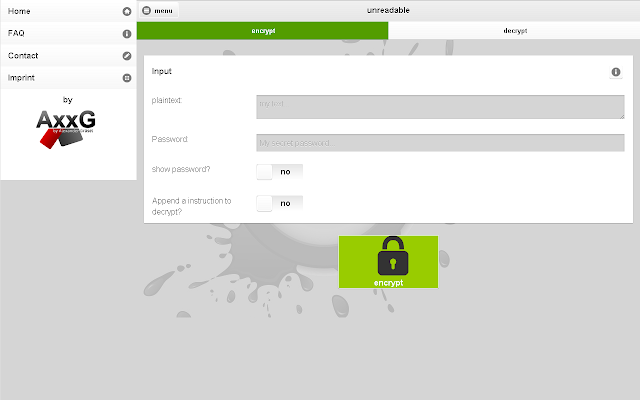
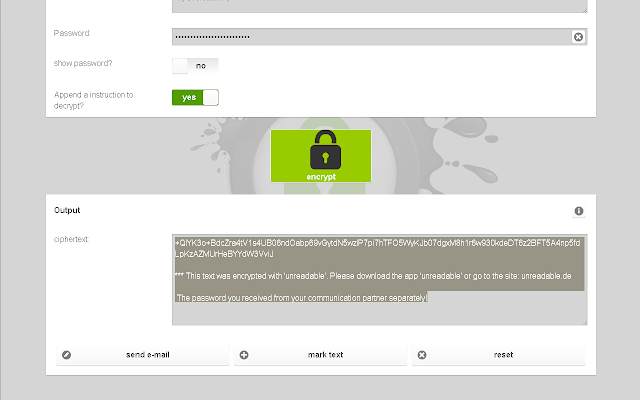
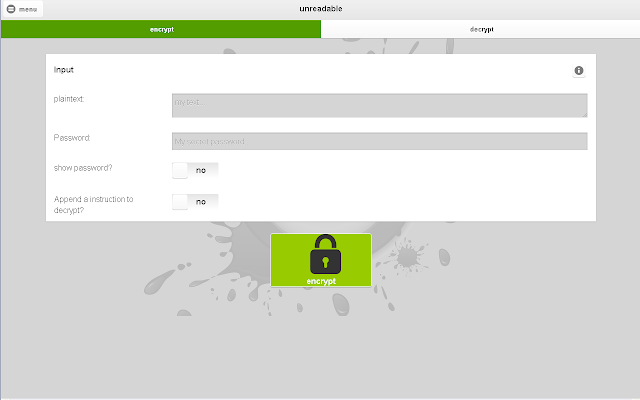
Unreadable is a free web service, as the name says it all it lets you easily encrypts and decrypts text independently of the transport (e-mail, Whatsapp, Facebook and co) and the platform (PC, smartphone, television, etc.). Using this awesome app you can secure all of your text and passwords.
All encrypted texts can be sent by Emails, USB / CD / DVD / Bluray (stored in a file), Facebook, Google+, Twitter, … WhatsApp, ChatON, Hangouts, Hike, whistle.im, Skype. It is compatible on all popular platforms like Android (Google Play, Amazon Appstore, Samsung Hub), iOS, BlackBerry, FireFox OS, Chrome OS, Windows, Linux, Mac OS X, … everything with a browser.
There many other functions this app does are:
256-bit key length
Offline Availability
Different languages: German, English
Protection against Data analysis-tools
Provides you fast and effective encryption and decryption of texts
Strong symmetric encryption algorithm (Advanced Encryption Standard short AES)
Platform independent The app works on the PC, the smartphone, camera, TV, etc. … everything, that has a browser;)
Mario is a popular old days video game. Mario is a fictional character in the Mario video game franchise by Nintendo, created by Japanese video game designer Shigeru Miyamoto. Serving as Nintendo’s mascot and the eponymous protagonist of the series, it has appeared in over 200 video games since his creation. It is said by many to be the most famous character in video game history. Mario games, as a whole, have sold more than 210 million units, making the Mario franchise the best-selling video game franchise of all time.
Now this article is on Best Super Mario Games chrome app available as free download at Google Web Store. This is a selection of Best Super Mario Games Online, including Mario Flash, Mario Star Scramble, Paper mario and much more for your Chrome/Chromebook’s personalized homepage.
You can play all games directly in your browser greatest hits, cool classic or innovative Super Mario games, like Super Mario`s Adventure 1 and 2, Super Mario Flash 1 and 2, Super Mario Bros. Star Scramble 1, 2 and 3, Paper Mario World and there are many more.
By default WordPress doesn’t provides you option to export Jetpack’s feedback data to CSV. Butby using Jetpack Feedback Exporter you can export Jetpack Contact Form Feedback data to a csv file. It enables you to select the form you like exporting, then click export, that’s all. The plugin is addon for Jetpack by WordPress.com plugin.
Plugin Features:
Export all data
Export into CSV
Opens easily in excel
Contains header tags
Optional Date
Exporting FeedBack Forms:
For exporting your Jetpack Feedback forms visit your admin area Dashboard -> Tools -> Feedback Exporter and choose desired form to export, you can include date, then finally click export and you are done.
Cookie Manager is a chrome extension made to protect your online privacy by managing your browser cookies with more control. You can add, edit and delete cookies from its toolbar. Also you can search cookies if there are many etc.
You must have observed this feature on Facebook. Facebook Poke is an old feature of Facebook. Now you can enable Poke in your BuddyPress site too. BuddyPress Poke is the new plugin by Anu Sharma. The plugin simply activates Poke in BuddyPress that enables your community members to poke other members, just like Facebook.
Other user profile
Poke screen
Error message
Poke back screen
Simply install and activate the plugin. Upon activate your logged in members will be able to poke by visiting other users profile and using poke button.
Quick Navigation provides you new fast and easy way of admin section post navigation. There many ways of editing your blog posts by generally bloggers use Dashboard -> Posts -> All Posts page. Now what this new plugin does is it add a filter on ‘All posts’ list admin page and you can open any post for editing by using this dropdown showing all post on that admin page list.
Second thing Quick Navigation does is it also adds a dropdown box is edit post page from where you can directly open any post for editing soon after editing or publishing content.
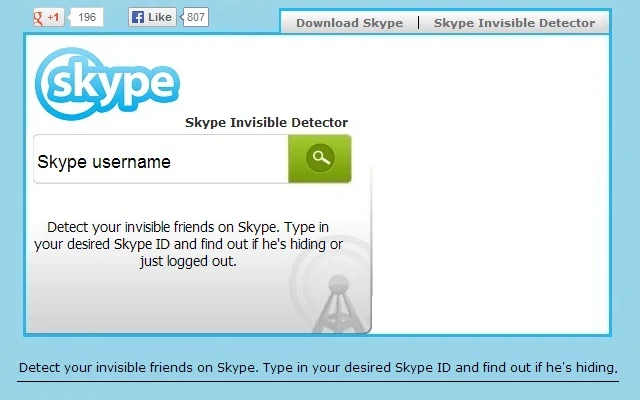
Skypedetector.com is a online tool that lets you know which skype friends are hiding themselves from you. With this cloud app you can detect your invisible friends on Skype b y typing in your desired Skype ID and it will find out if he’s hiding or just logged out.
Type in your desired Skype ID and click the search button
The app detects real status of Skype users and your privacy is 100% protected, as advertised. The application doesn’t saves or share scanned skype users id.
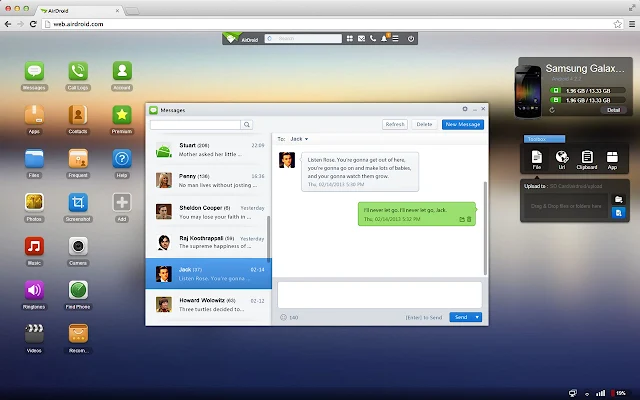
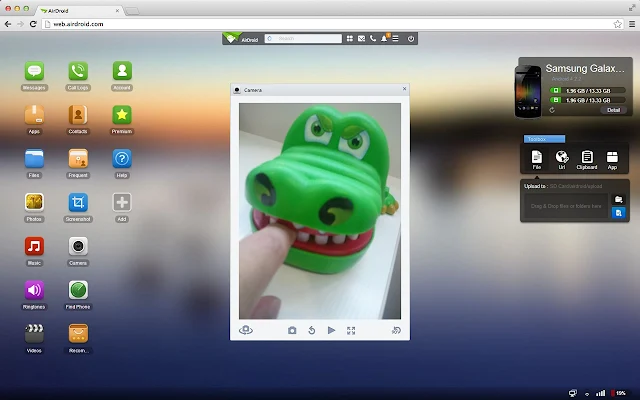
AirDroid is a powerful but free cloud app that allows you to manage all your Android devices right from a web browser, your chromebook, from anywhere, from any web browser, all over the air. The application provides you complete control over your Android devices and best part is Desktop SMS that lest you easily Send & receive SMS right from your computer, you can type SMS using your keyboard giving your complete comfort with faster typing and navigation with the full keyboard and large screen.
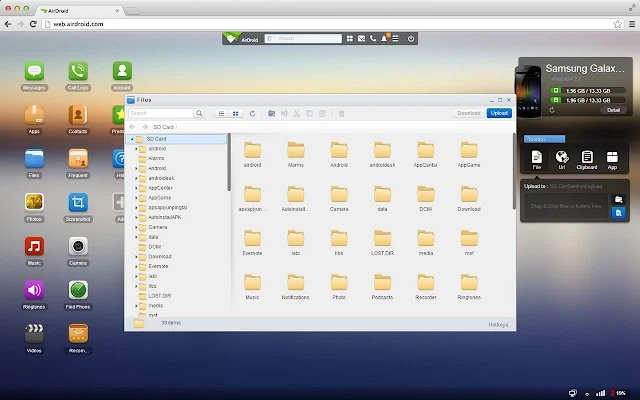
Other features allows you to manage Files and Media. You can move photos, videos, ringtones and any other files on and off Android, all without a USB cable.
You can manage your Phone Calls, Clipboard , URL transfer. Make Calls, Contact, Share Clipboard Content across devices, push URL to Android and there are more features awaiting for you to discover them.
How to use AirDroid to manage all your Android devices from a web browser?
Step-1 First thing you need to do is visit http://web.airdroid.com/ and sign up your account. You may signup using your Facebook, Google etc accounts too. After you signup you will see a Android Home like desktop showing up in your web browser window.
Step-2 Now you may connect your Android devices. Install AirDroid App from Google Play, click sign-in button and login with the same account and your device will be connected.
You can Manage your Android Apps, gets to easy app search, installation and apk export. You can see through the lens of your Android camera, front and back. Or stream the screen of your Android in nearly real-time.
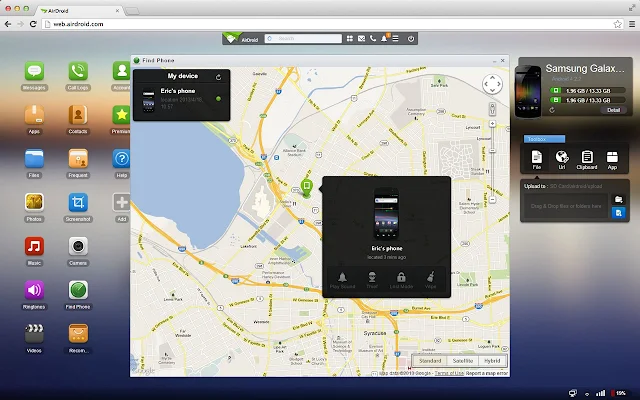
Not only this much but even you can find the location of your phone. Yes you can locate and lock your Android from any browser in-case if it’s lost. Also you can wipe all its data remotely.
Pearltrees is an awesome cloud service good to mind map links. It is a place where you can collect, organize and share everything you like on the world wide web. It is a free webservice where you can share all your interests in one place. It provides you easy visual interface and its community lets you discover amazing stuff related to your interests and passions
https://www.youtube.com/watch?v=VSg9RSAlAzw
Features:
Have everything you like at your fingertips all the time
Access your pearltrees from anywhere: desktops, tablets and smartphones
Keep everything you like: web pages, photos and notes from any app
Browse your favorite things blazingly fast
Discover interesting new stuff in your areas of interest
You can turn any simple WordPress page into a Resume Page by using the new easy WordPress plugin called Resume Page. The plugin provides you all inbuilt basics for all what a resume page needs. The plugin follows traditional resume layout and is completely customizable with in-built design options and also you can add your custom CSS.
It provides you power to turn any page of your website into a different resume page. It also has a smart templating feature that enables developers to easily override the template simply by dropping it into child theme.
Resume Page with stacked corners.
Resume page with flat view and background image
Github and Portfolio integration
How to use Resume Page Plugin?
Install and activate Resume Page. Upon activation the plugin automatically adds various metaboxes in Add New/Edit Pages. For creating a new resume page all you have to do is create a new page from Dashboard -> Pages -> Add New and tick ‘Make this page a Resume Page’ option in Resume Page metabox, you can also select your resume page theme, layout and manage its sections right from the page admin section.
Color Mail is a free cloud service you can use for creating and sending styled emailed much similar to old days stylish letter pads but here you can easily style your text too. The website service provides you can easy & user-friendly tool that helps you to create and send colourful styled emails to your friends, relatives etc on special occasions.
You can design beautiful email cards using hundreds of email cards templates. You can choose email card template, edit content, and then finally send out the email right from the app’s page. Your color email card will be an attachment to sent email which is compatible to Android, Linux, Mac, Windows and most mobile devices and operating systems.
Archiver for Gmail is a script for Google Chrome. It seamlessly analyze your Gmail inbox and moves all of the big attachments to your Google drive, you can do it in one click. It also provides you background features for automatically copying email attachments to Google Drive.
Script is easy to use. Simply install its extension (Archiver for Gmail) in your Chrome then follow the steps:
Visit your Chrome Apps page and launch Archiver for Gmail
First it will ask for authorization, complete app authorization by following on screen steps
After completing authorization you will be seeing this scripts main page, simply click the ‘Start‘ button to begin the process.
Now it will automatically copy all your big email attachments (1 MB or bigger) to Google Drive and label your incoming emails based on the attachment size.
The script also saves a HTML copy of the whole email thread and makes you free to delete each email containing big attachments (this can be even done automatically). All messages containing relevant attachments will be labelled, so that you can index your inbox even better.
If you like writing long articles with multiple headings, ONet Auto Headline Anchor will allows you to add a link next to your headings so that your readers can easily share posts pointing to specific parts, you might have noticed this feature in GitHub and on some websites running on Mediawiki. The feature is also loaded with a smooth scroll script.
Upon activation visit your admin area Dashboard -> Settings -> Reading
Scroll down to ONet Auto Headline Anchor settings section and select your settings
It allows you to set the options like Enable parse, Choose Linkify style, Linkify style, Smooth scroll, Use cache, Select Tags to parse from H1 to H6, Add support for posts & pages
Also you can get a TOC of content by using ONetAutoHeadlineAnchor::get_toc([content],[optional: return hierarchical or raw list]).
The plugin contains a predefined style for Git-like link display but it is hardly recommend to change the style to fit your needs (and your design).
You can improve your WordPress site pagination by adding enabling extra input number that simply allows users to jump to any (x) page. There are various pagination plugins that changes default ‘Older Posts’ & ‘Newer Posts’ option to page number, now this tutorial explains you to add one extra function that enables users to jump to some page number directly.
You can fetch yours or someone else’s YouTube video (uploads or favorites) from YouTube channels to create beautiful albums with retrieved info into your WordPress site. Srizon Responsive Youtube Album is the new WordPress plugin by srizon.com. Using this new plugin you can create video albums, the play video on a responsive lightbox, you can add as many albums as you want and display them using shortcodes which are generated automatically, you can copy/paste them into your blog post, page or any other custom post type etc.
Install and activate Srizon Responsive Youtube Album. Upon activation the plugin adds a new menu ‘YouTube Album’ in WordPress admin area. Follow the given steps:
From Dashboard -> YouTube Albums menu click on the Albums submenu
Click “Add New” button to add a new album. (or click on an existing album title to edit that)
Fill-up or modify the form and save that
Your albums will be listed along with the shortcodes. Use the shortcodes into your page/post to show the video album
Try out different options to suit your need
Thumb with description layout – wide view Thumb Grid layout – wide view Video in responsive lightbox – wide view Video in responsive lightbox – small screen Thumb Grid layout – small screen Admin View – Adding album – basic Admin View – Adding album – layout related options
Admin View – Album list with shortcodes
FavHero – Favicon Generator is a quick one-click favicon generator for WordPress sites. With this new plugin you can instantly in just one click generate favion from any image you have in your WordPress media library. Install and activate FavHero – Favicon Generator plugin, after activation visit your admin area Dashboard -> Settings -> FavHero Favicons page, click ‘Select Faviocn‘ button to select an image from your media library to make it your website’s favicon. Also you can upload any image from your local hardrive and make it your site’s favicon.
Jetpack is a popular WordPress plugin that provides you a package of various cool features designed by WordPress.Com. This tutorial is on new WordPress plugin that installs only sharing module of Jetpack into your WordPress site. Useful for the users interested in only sharing feature of Jetpack, now there is no need of installing whole package.
Jetpack Sharing is the new WordPress plugin by Anas H. Sulaiman. The plugin contains Jetpack’s sharing module and activates it in your WordPress site. Simply install and activate it the visit your admin area Dashboard -> Settings -> Sharing page and set the options.
Features: All what you get in Official Jetpack’s Sharing Module:
Choose social networks buttons you’d like to add.
Drag and drop style for button selection.
Hide some buttons behind a share button.
Add your own custom buttons.
Choose from 4 different buttons styles: icon only, text only, icon + text, or official buttons.
Custom sharing label. (displayed next to sharing buttons)
Open links in the same window, or in a new one.
Choose where the buttons show up.
Preview how the buttons will be appear on your website, right from the settings page.
You can disable your website comments by referers which means you can ban visitors from some websites from viewing or adding comments to your website’s posts, pages etc.
How to disable comments by referer?
Disable Comments By Referer is the new WordPress plugin that lets you selectively disable comments for visitors coming from certain websites (e.g. reddit).
Install and activate the plugin then follow the given steps:
Upon activation visit your admin area Dashboard -> Settings -> Discussion page
Scroll down to ‘Referer Blacklist for Comments’ section (added at the very bottom of the page).
Type the a comma-separated bare hostnames, (ex: www.reddit.com, news.ycombinator.com.) in the given text area as shown in following given screenshot:
That’s all. Save your settings and you are done. How it works?
If a visitor’s HTTP referer matches to one of the hosts you’ve blacklisted then the your post will look like as comments have been disabled on your website, neither existing comments nor the new comment form is displayed.